> ## Documentation Index
> Fetch the complete documentation index at: https://docs.magichour.ai/llms.txt
> Use this file to discover all available pages before exploring further.
# Usage-Based Pricing
> Pay only for what you use with automatic monthly billing and volume discounts.
export const PricingCard = ({title = "", prices = [], benefits = []}) => {
return
{prices && prices.length > 0 &&
}
;
};
## How Usage-Based Pricing Works
**Simple concept:** You pay only for the credits you actually use each month. No upfront payments, no unused credits going to waste.
### **The Basics**
1. **Add a payment method** to your account
2. **Choose your tier** based on resolution needs and expected usage
3. **Use the API** - credits are consumed as you generate content
4. **Get billed monthly** based on your actual usage
5. **Automatic volume discounts** apply as you use more credits
### **Key Benefits**
✅ **No upfront costs** - Start using immediately without buying credits in advance\
✅ **Pay for actual usage** - Only pay for credits you actually consume\
✅ **Automatic billing** - Monthly invoices based on previous month's usage\
✅ **Volume discounts** - Up to 50% savings as you scale\
✅ **No waste** - Never lose unused credits
### **How It Differs from Subscriptions**
| Usage-Based | Subscription |
| :------------------------- | :--------------------------- |
| Pay after you use | Pay upfront |
| Automatic monthly billing | Manual credit purchases |
| Volume discounts included | Fixed credit amounts |
| No unused credits | Prepaid credits never expire |
| Perfect for variable usage | Good for predictable usage |
## Choose Your Tier
Each tier offers different resolution limits and credit pricing. Higher tiers unlock better resolution but cost more per credit.
## Volume Discounts (Automatic)
The more credits you use each month, the cheaper each credit becomes. Discounts apply automatically to different usage ranges within the same month.
**Example:** If you use 150,000 credits on Starter tier:
* First 100,000 credits: \$0.90 per 1000 credits
* Next 50,000 credits: \$0.81 per 1000 credits (10% discount)
* **Total cost:** \$90 + \$40.50 = \$130.50
### **Discount Tiers by Plan**
| Credit usage per month | Discount on credits in this range | Cost per 1000 credits |
| ----------------------- | --------------------------------- | --------------------- |
| 0 - 100,000 | 0% | \$0.900 |
| 100,001 - 1,000,000 | 10% | \$0.810 |
| 1,000,001 - 5,000,000 | 20% | \$0.720 |
| 5,000,001 - 10,000,000 | 30% | \$0.630 |
| 10,000,001 - 50,000,000 | 40% | \$0.540 |
| 50,000,000+ | 50% | \$0.450 |
| Credit usage per month | Discount on credits in this range | Cost per 1000 credits |
| ----------------------- | --------------------------------- | --------------------- |
| 0 - 100,000 | 0% | \$1.200 |
| 100,001 - 1,000,000 | 10% | \$1.080 |
| 1,000,001 - 5,000,000 | 20% | \$0.960 |
| 5,000,001 - 10,000,000 | 30% | \$0.840 |
| 10,000,001 - 50,000,000 | 40% | \$0.720 |
| 50,000,000+ | 50% | \$0.600 |
| Credit usage per month | Discount on credits in this range | Cost per 1000 credits |
| ----------------------- | --------------------------------- | --------------------- |
| 0 - 100,000 | 0% | \$1.950 |
| 100,001 - 1,000,000 | 10% | \$1.755 |
| 1,000,001 - 5,000,000 | 20% | \$1.560 |
| 5,000,001 - 10,000,000 | 30% | \$1.365 |
| 10,000,001 - 50,000,000 | 40% | \$1.170 |
| 50,000,000+ | 50% | \$0.975 |
| Credit usage per month | Discount on credits in this range | Cost per 1000 credits |
| ----------------------- | --------------------------------- | --------------------- |
| 0 - 100,000 | 0% | \$2.500 |
| 100,001 - 1,000,000 | 10% | \$2.250 |
| 1,000,001 - 5,000,000 | 20% | \$2.000 |
| 5,000,001 - 10,000,000 | 30% | \$1.750 |
| 10,000,001 - 50,000,000 | 40% | \$1.500 |
| 50,000,000+ | 50% | \$1.250 |
Usage resets at midnight on the first of each month PST time
## Practical Examples
### **Small Developer (5,000 credits/month)**
* **Starter Tier**: 5,000 × \$0.0009 = **\$4.50/month**
* **Creator Tier**: 5,000 × \$0.0012 = **\$6.00/month**
*Choose Starter for basic resolution, Creator for higher quality*
### **Growing Business (75,000 credits/month)**
* **Starter Tier**: \$67.50/month (all at base rate)
* **Creator Tier**: \$90/month (all at base rate)
* **Pro Tier**: \$146.25/month (all at base rate)
*Volume discounts kick in at 100,000+ credits*
### **High Volume (500,000 credits/month)**
**Starter Tier with volume discounts:**
* First 100,000: \$90 (base rate)
* Next 400,000: \$324 (10% discount)
* **Total: \$414/month** (vs \$450 without discounts)
**Use our [cost calculator](https://magichour.ai/api#api-cost-calculator) for precise estimates with volume discounts included.**
## Getting Started
**Currently requires setup assistance** - Usage-based pricing is not yet self-serve. We're working
on making this automatic.
**To get started:**
1. **Contact our team** to set up usage-based billing:
* Email: [support@magichour.ai](mailto:support@magichour.ai)
* Use the Intercom chat widget on our website
2. **Choose your tier** based on resolution needs and expected usage
3. **Add payment method** - We'll help you set this up securely
4. **Start using the API** - Credits are tracked automatically
### **Billing Process**
* **Monthly billing** on the same date each month
* **High usage accounts** may be billed earlier (e.g., at \$500 threshold)
* **Detailed invoices** show credit usage breakdown by tier
* **Volume discounts** applied automatically
## Tracking usage
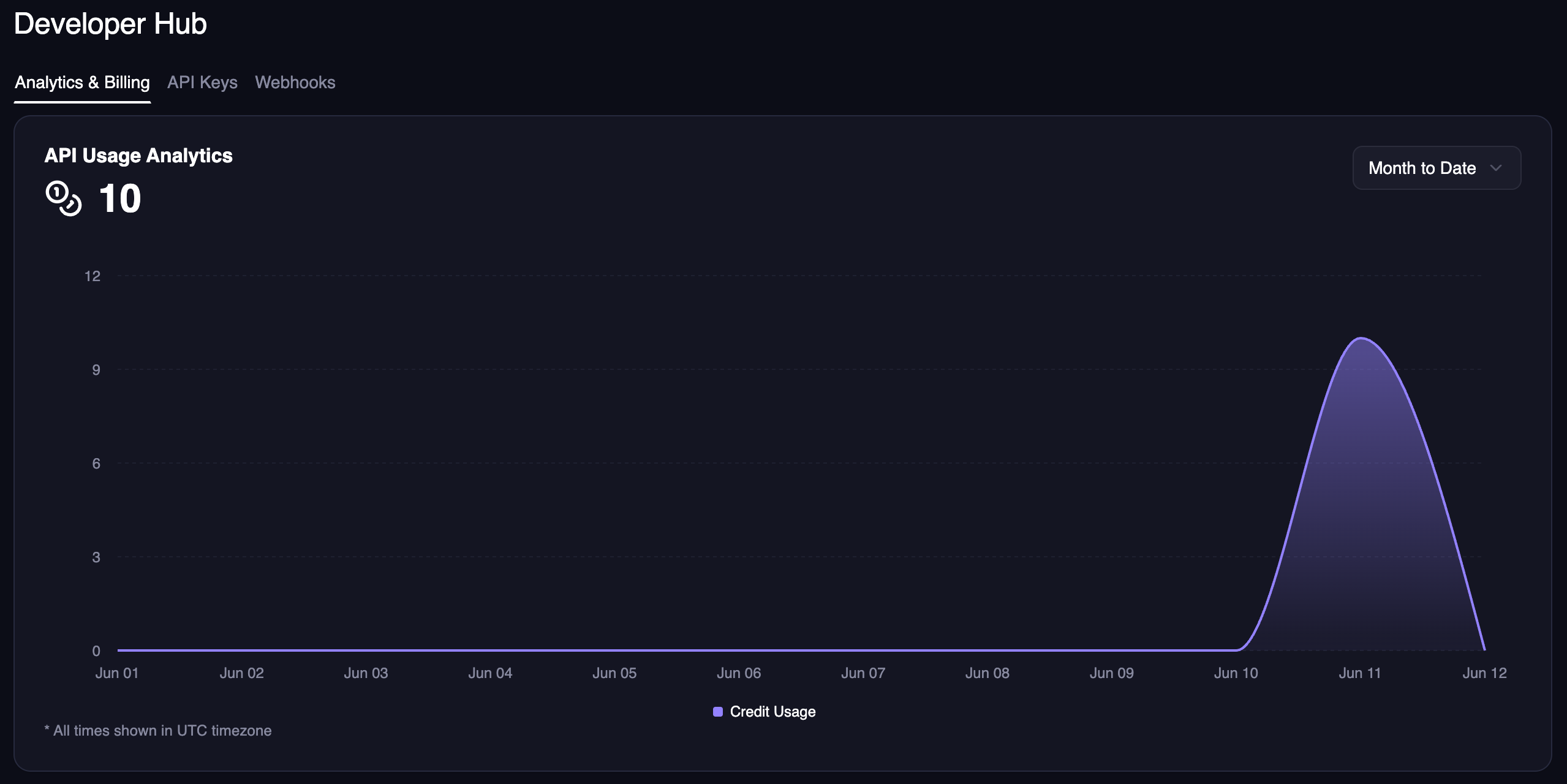
In the [Developer Hub](https://magichour.ai/developer), you can see your usage analytics for specific time ranges.
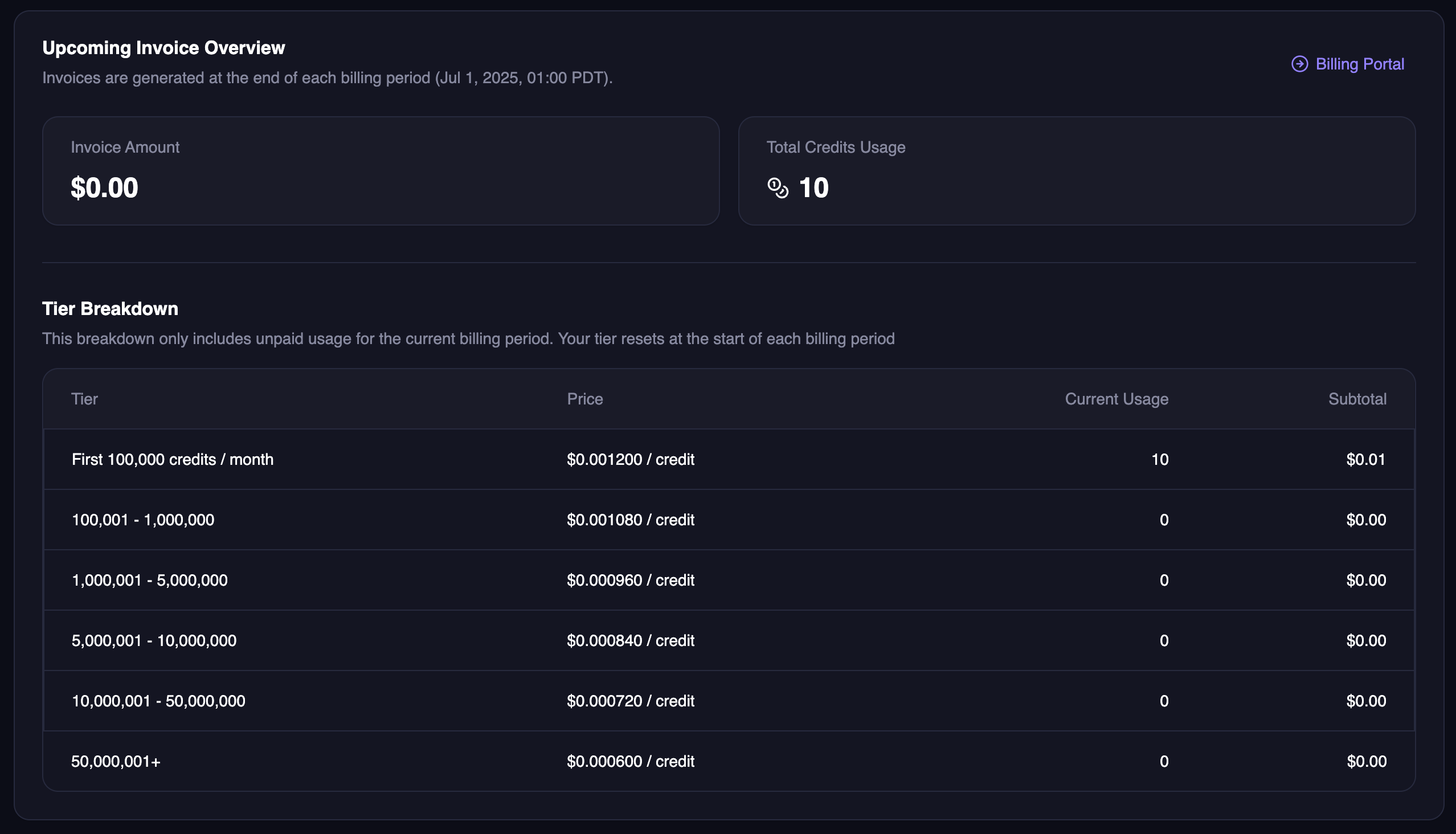
Also, you can view your upcoming invoice amount and total credit usage broken down by tier.
 Also, you can view your upcoming invoice amount and total credit usage broken down by tier.