> ## Documentation Index
> Fetch the complete documentation index at: https://docs.magichour.ai/llms.txt
> Use this file to discover all available pages before exploring further.
# Quick Start
> Generate an API key and make your first call in <3 minutes.
Magic Hour is an AI video and image generation platform. You submit a job, we render it, and you download the result. This guide gets you to your first output in a few minutes.
**What you'll accomplish:**
1. **Create an API key** - Get credentials to authenticate with our API
2. **Set up your development environment** - Install SDK and create project files
3. **Generate your first image** - Make an API call and download the result (costs \~100 credits)
**Credit Cost:** The examples in this guide will use approximately 100 credits. New accounts get
400 free credits plus 100 daily credits if you claim them in the web app.
## 1. Create your API key
**Why:** API keys authenticate your requests and track your usage.
1. Visit the [Magic Hour Developer Hub](https://magichour.ai/developer?tab=api-keys) and sign in.
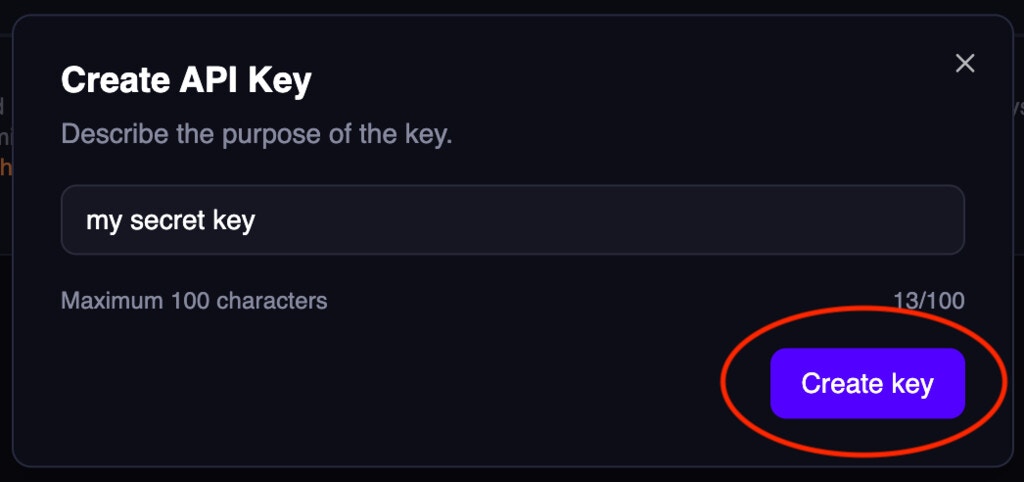
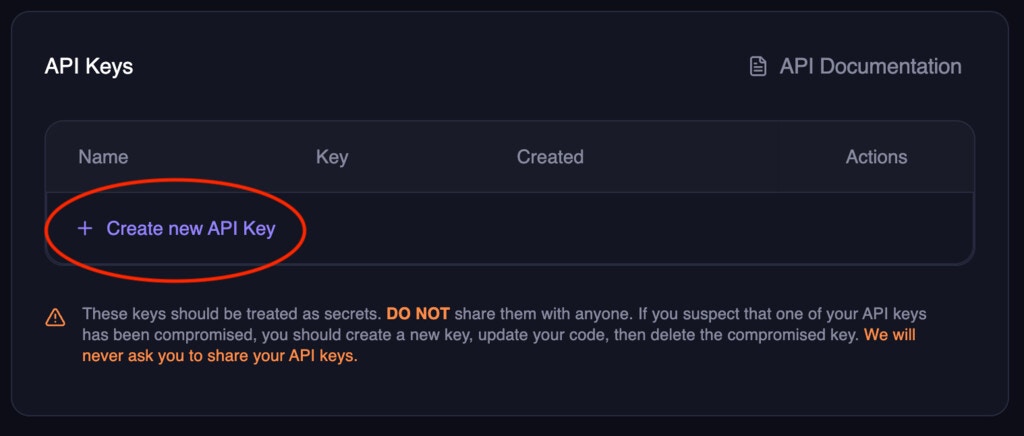 2. Name the key (e.g., "My First Project"), then click `Create key`.
 3. **Copy the API key immediately** - you won't be able to see it again.
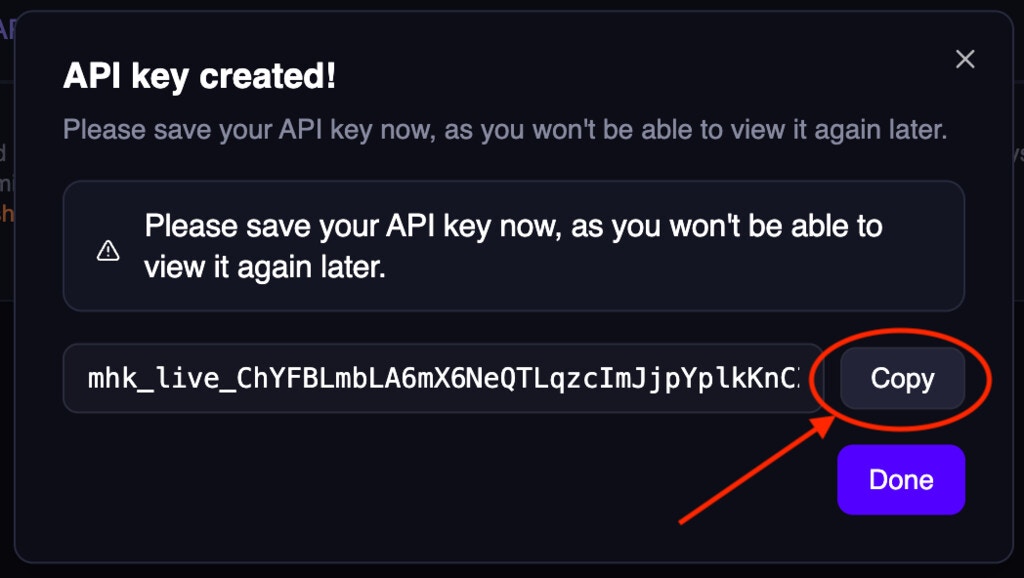 ### Save your API key securely
**Important:** Store your API key as an environment variable for security:
```bash macOS/Linux theme={null}
# Add to your ~/.bashrc or ~/.zshrc file
export MAGIC_HOUR_API_KEY="your_api_key_here"
# Reload your shell
source ~/.bashrc # or source ~/.zshrc
```
```cmd Windows theme={null}
# Set environment variable (Command Prompt)
setx MAGIC_HOUR_API_KEY "your_api_key_here"
# Restart your terminal after running this command
```
```powershell PowerShell theme={null}
# Option A: Set permanently (requires terminal restart)
[Environment]::SetEnvironmentVariable("MAGIC_HOUR_API_KEY", "your_api_key_here", "User")
# Option B: Set for current session only (no restart needed)
$env:MAGIC_HOUR_API_KEY = "your_api_key_here"
```
**PowerShell:** `SetEnvironmentVariable` only takes effect in **new** terminal sessions. If you
run your script in the same terminal, use `$env:MAGIC_HOUR_API_KEY` instead to set it for the
current session.
**Never commit API keys to version control.** Always use environment variables or secure
credential management.
## 2. Set up your development environment
**Why:** SDKs handle authentication, polling, and file downloads automatically, reducing boilerplate code.
### Create your project directory
```bash Python theme={null}
# Create and navigate to project directory
mkdir magic-hour-quickstart
cd magic-hour-quickstart
# Create your Python file
touch main.py
```
```bash Node.js theme={null}
# Create and navigate to project directory
mkdir magic-hour-quickstart
cd magic-hour-quickstart
# Initialize npm project
npm init -y
# Enable ES module support (required for the SDK)
echo '{"type":"module"}' > package.json
# Create your JavaScript file
touch main.js
```
```bash Go theme={null}
# Create and navigate to project directory
mkdir magic-hour-quickstart
cd magic-hour-quickstart
# Initialize Go module
go mod init magic-hour-quickstart
# Create your Go file
touch main.go
```
```bash Rust theme={null}
# Create new Rust project
cargo new magic-hour-quickstart
cd magic-hour-quickstart
```
### Install the SDK
```sh Python SDK theme={null} theme={null} theme={null}
pip install magic_hour
```
```sh Node SDK theme={null} theme={null} theme={null}
npm install magic-hour
```
```sh Go SDK theme={null} theme={null} theme={null}
go get -u github.com/magichourhq/magic-hour-go
```
```sh Rust SDK theme={null} theme={null} theme={null}
cargo add magic_hour
```
## 3. Generate your first image
**What we're doing:** Creating an AI-generated image using a text prompt. The API will:
1. Queue your job and return a project ID
2. Process your request (usually takes 30-60 seconds)
3. Make the result available for download
**Why these parameters:**
* `image_count: 1` - Generate one image (costs 5 credits)
* `aspect_ratio: "16:9"` - Widescreen (landscape) output; also supports `1:1` and `9:16`
* `wait_for_completion: true` - SDK polls until done
* `download_outputs: true` - Automatically download to local disk
* `download_directory: "."` - Save to the current directory
### Copy the code and run it
1. **Copy the code** from your preferred language tab below. You can choose from two types of output
```python Python SDK theme={null}
from magic_hour import Client
import time
import os
import urllib.request
# Use environment variable for security
client = Client(token=os.getenv("MAGIC_HOUR_API_KEY"))
result = client.v1.ai_image_generator.generate(
image_count=1,
aspect_ratio="16:9",
style={
"prompt": "Epic anime art of wizard casting a cosmic spell in the sky that says 'Magic Hour'"
},
wait_for_completion=True, # wait for the render to complete
download_outputs=True, # download the outputs to local disk
download_directory=".", # save the outputs to the current directory
)
print(f"created image with id {result.id}, spent {result.credits_charged} credits. Outputs are saved at {result.downloaded_paths}")
```
```typescript Node SDK theme={null}
import { Client } from "magic-hour";
// Use environment variable for security
const client = new Client({ token: process.env.MAGIC_HOUR_API_KEY });
async function main() {
const createRes = await client.v1.aiImageGenerator.generate(
{
imageCount: 1,
aspectRatio: "16:9",
style: {
prompt: "Epic anime art of wizard casting a cosmic spell in the sky that says 'Magic Hour'",
},
},
{
waitForCompletion: true, // wait for the render to complete
downloadOutputs: true, // download the outputs to local disk
downloadDirectory: ".", // save the outputs to the current directory
}
);
console.log(
`created image with id ${createRes.id}, spent ${createRes.creditsCharged} credits. Outputs are saved at ${createRes.downloadedPaths}`
);
}
main();
```
```go Go SDK theme={null}
package main
import (
"fmt"
"io"
"net/http"
"os"
"time"
sdk "github.com/magichourhq/magic-hour-go/client"
nullable "github.com/magichourhq/magic-hour-go/nullable"
"github.com/magichourhq/magic-hour-go/resources/v1/ai_image_generator"
"github.com/magichourhq/magic-hour-go/resources/v1/image_projects"
"github.com/magichourhq/magic-hour-go/types"
)
func main() {
// Use environment variable for security
client := sdk.NewClient(sdk.WithBearerAuth(os.Getenv("MAGIC_HOUR_API_KEY")))
createRes, err := client.V1.AiImageGenerator.Create(ai_image_generator.CreateRequest{
ImageCount: 1,
AspectRatio: nullable.NewValue(types.V1AiImageGeneratorCreateBodyAspectRatioEnum169),
Style: types.V1AiImageGeneratorCreateBodyStyle{
Prompt: "Epic anime art of wizard casting a cosmic spell in the sky that says 'Magic Hour'",
},
})
if err != nil {
fmt.Println(err)
return
}
fmt.Printf("queued image with id %s, spent %d credits\n", createRes.Id, createRes.CreditsCharged)
for {
res, err := client.V1.ImageProjects.Get(image_projects.GetRequest{Id: createRes.Id})
if err != nil {
fmt.Println(err)
return
}
if res.Status == "complete" {
println("render complete!")
url := res.Downloads[0].Url
outputFile := "output.png"
resp, err := http.Get(url)
if err != nil {
fmt.Println(err)
return
}
defer resp.Body.Close()
out, err := os.Create(outputFile)
if err != nil {
fmt.Println(err)
return
}
defer out.Close()
_, err = io.Copy(out, resp.Body)
if err != nil {
fmt.Println(err)
return
}
fmt.Printf("file downloaded successfully to %s\n", outputFile)
break
} else if res.Status == "error" {
println("render failed")
break
} else {
fmt.Printf("render in progress: %s\n", res.Status)
time.Sleep(1 * time.Second)
}
}
}
```
```rust Rust SDK theme={null}
use magic_hour;
use reqwest;
use std::io::Read;
#[tokio::main]
async fn main() {
// Use environment variable for security
let api_key = std::env::var("MAGIC_HOUR_API_KEY")
.expect("MAGIC_HOUR_API_KEY environment variable not set");
let mut client = magic_hour::Client::default().with_bearer_auth(&api_key);
let create_res = client
.v1()
.ai_image_generator()
.create(magic_hour::resources::v1::ai_image_generator::CreateRequest {
image_count: 1,
aspect_ratio: Some(magic_hour::models::V1AiImageGeneratorCreateBodyAspectRatioEnum::Enum169),
style: magic_hour::models::V1AiImageGeneratorCreateBodyStyle {
prompt: "Epic anime art of wizard casting a cosmic spell in the sky that says 'Magic Hour'".to_string(),
..Default::default()
},
..Default::default()
})
.await
.unwrap();
let project_id = create_res.id;
let credits_charged = create_res.credits_charged;
println!("queued image with id {project_id}, spent {credits_charged} credits");
loop {
let res = client
.v1()
.image_projects()
.get(magic_hour::resources::v1::image_projects::GetRequest {
id: project_id.clone(),
})
.await
.unwrap();
match res.status {
magic_hour::models::GetV1ImageProjectsIdResponseStatusEnum::Complete => {
println!("render complete!");
let url = res.downloads[0].url.clone();
tokio::task::block_in_place(move || {
let response = reqwest::blocking::get(url).unwrap();
let output_path = "output.png";
if response.status().is_success() {
let mut output_file = std::fs::File::create(output_path).unwrap();
std::io::copy(&mut response, &mut output_file).unwrap();
println!("file downloaded successfully to {}", output_path);
} else {
println!("failed to download file: {}", response.status());
}
});
return;
}
magic_hour::models::GetV1ImageProjectsIdResponseStatusEnum::Error => {
println!("render failed");
return;
}
_ => {
println!("render in progress: {}", res.status);
std::thread::sleep(std::time::Duration::from_secs(1));
}
}
}
}
```
```sh cURL theme={null}
#!/bin/bash
set -e
URL="https://api.magichour.ai/v1/ai-image-generator"
STATUS_URL="https://api.magichour.ai/v1/image-projects"
# Use environment variable for security
API_KEY="$MAGIC_HOUR_API_KEY"
OUTPUT_PATH="output.png"
create_response=$(curl -s $URL \
--request POST \
--header "Content-Type: application/json" \
--header "Authorization: Bearer $API_KEY" \
--data '{
"image_count": 1,
"aspect_ratio": "16:9",
"style": {
"prompt": "Epic anime art of wizard casting a cosmic spell in the sky that says \"Magic Hour\""
}
}')
project_id=$(echo $create_response | jq -r '.id')
credits_charged=$(echo $create_response | jq -r '.credits_charged')
echo "queued image with id $project_id, spent $credits_charged credits"
while true; do
status_response=$(curl -s $STATUS_URL/$project_id --header "Authorization: Bearer $API_KEY")
status=$(echo $status_response | jq -r '.status')
if [ "$status" == "complete" ]; then
echo "render complete!"
download_url=$(echo $status_response | jq -r '.downloads[0].url')
echo "downloading image from $download_url..."
curl -s $download_url -o $OUTPUT_PATH
echo "file downloaded successfully to $OUTPUT_PATH"
break
elif [ "$status" == "error" ]; then
echo "render failed"
break
else
echo "render in progress"
sleep 1
fi
done
```
```python Python SDK theme={null}
from magic_hour import Client
import time
import os
import urllib.request
# Use environment variable for security
client = Client(token=os.getenv("MAGIC_HOUR_API_KEY"))
result = client.v1.face_swap.generate(
name="Swap Tom Cruise into Iron Man scene",
assets={
"image_file_path": "https://videos.magichour.ai/api-assets/sample/tom-cruise.png",
"video_file_path": "https://videos.magichour.ai/api-assets/sample/iron-man.mp4",
"video_source": "file",
},
start_seconds=2.3,
end_seconds=8.5,
wait_for_completion=True, # wait for the render to complete
download_outputs=True, # download the outputs to local disk
download_directory=".", # save the outputs to the current directory
)
print(f"created face swap video with id {result.id}, spent {result.credits_charged} credits. Outputs are saved at {result.downloaded_paths}")
```
```typescript Node SDK theme={null}
import { Client } from "magic-hour";
// Use environment variable for security
const client = new Client({ token: process.env.MAGIC_HOUR_API_KEY });
async function main() {
const createRes = await client.v1.faceSwap.generate(
{
name: "Swap Tom Cruise into Iron Man scene",
assets: {
imageFilePath: "https://videos.magichour.ai/api-assets/sample/tom-cruise.png",
videoFilePath: "https://videos.magichour.ai/api-assets/sample/iron-man.mp4",
videoSource: "file",
},
startSeconds: 2.3,
endSeconds: 8.5,
},
{
waitForCompletion: true, // wait for the render to complete
downloadOutputs: true, // download the outputs to local disk
downloadDirectory: ".", // save the outputs to the current directory
}
);
console.log(
`created face swap video with id ${createRes.id}, spent ${createRes.creditsCharged} credits. Outputs are saved at ${createRes.downloadedPaths}`
);
}
main();
```
```go Go SDK theme={null}
package main
import (
"fmt"
"io"
"net/http"
"os"
"time"
sdk "github.com/magichourhq/magic-hour-go/client"
nullable "github.com/magichourhq/magic-hour-go/nullable"
"github.com/magichourhq/magic-hour-go/resources/v1/face_swap"
"github.com/magichourhq/magic-hour-go/resources/v1/video_projects"
"github.com/magichourhq/magic-hour-go/types"
)
func main() {
// Use environment variable for security
client := sdk.NewClient(sdk.WithBearerAuth(os.Getenv("MAGIC_HOUR_API_KEY")))
createRes, err := client.V1.FaceSwap.Create(face_swap.CreateRequest{
Name: nullable.NewValue("Swap Tom Cruise into Iron Man scene"),
Assets: types.PostV1FaceSwapBodyAssets{
ImageFilePath: "https://videos.magichour.ai/api-assets/sample/tom-cruise.png",
VideoFilePath: nullable.NewValue("https://videos.magichour.ai/api-assets/sample/iron-man.mp4"),
VideoSource: types.PostV1FaceSwapBodyAssetsVideoSourceEnumFile,
},
StartSeconds: 2.3,
EndSeconds: 8.5,
Height: 288,
Width: 512,
})
if err != nil {
fmt.Println(err)
return
}
fmt.Printf("queued video with id %s, spent %d credits based on 30fps. This value will be adjusted after render completes if fps is different.\n", createRes.Id, createRes.CreditsCharged)
for {
res, err := client.V1.VideoProjects.Get(video_projects.GetRequest{Id: createRes.Id})
if err != nil {
fmt.Println(err)
return
}
if res.Status == "complete" {
fmt.Printf("render complete! Final credits charged is %d, actual fps is %f.\n", res.CreditsCharged, res.Fps)
url := res.Downloads[0].Url
outputFile := "output.mp4"
resp, err := http.Get(url)
if err != nil {
fmt.Println(err)
return
}
defer resp.Body.Close()
out, err := os.Create(outputFile)
if err != nil {
fmt.Println(err)
return
}
defer out.Close()
_, err = io.Copy(out, resp.Body)
if err != nil {
fmt.Println(err)
return
}
fmt.Printf("file downloaded successfully to %s\n", outputFile)
break
} else if res.Status == "error" {
println("render failed")
break
} else {
fmt.Printf("render in progress: %s\n", res.Status)
time.Sleep(1 * time.Second)
}
}
}
```
```rust Rust SDK theme={null}
use magic_hour;
use reqwest;
use std::io::Read;
#[tokio::main]
async fn main() {
// Use environment variable for security
let api_key = std::env::var("MAGIC_HOUR_API_KEY")
.expect("MAGIC_HOUR_API_KEY environment variable not set");
let mut client = magic_hour::Client::default().with_bearer_auth(&api_key);
let create_res = client
.v1()
.face_swap()
.create(magic_hour::resources::v1::face_swap::CreateRequest {
name: Some("Swap Tom Cruise into Iron Man scene".to_string()),
assets: magic_hour::models::PostV1FaceSwapBodyAssets {
image_file_path: "https://videos.magichour.ai/api-assets/sample/tom-cruise.png"
.to_string(),
video_file_path: Some(
"https://videos.magichour.ai/api-assets/sample/iron-man.mp4".to_string(),
),
video_source: magic_hour::models::PostV1FaceSwapBodyAssetsVideoSourceEnum::File,
..Default::default()
},
start_seconds: 2.3,
end_seconds: 8.5,
height: 288,
width: 512,
..Default::default()
})
.await
.unwrap();
let project_id = create_res.id;
let credits_charged = create_res.credits_charged;
println!("queued face swap video with id {project_id}, spent {credits_charged} credits based on 30fps. This value will be updated after render completes if fps is different.");
loop {
let res = client
.v1()
.video_projects()
.get(magic_hour::resources::v1::video_projects::GetRequest {
id: project_id.clone(),
})
.await
.unwrap();
match res.status {
magic_hour::models::GetV1VideoProjectsIdResponseStatusEnum::Complete => {
println!(
"render complete! Final credit charged is {}, actual fps is {}",
res.credits_charged, res.fps
);
let url = res.downloads[0].url.clone();
tokio::task::block_in_place(move || {
let response = reqwest::blocking::get(url).unwrap();
let output_path = "output.mp4";
if response.status().is_success() {
let mut output_file = std::fs::File::create(output_path).unwrap();
std::io::copy(&mut response, &mut output_file).unwrap();
println!("file downloaded successfully to {}", output_path);
} else {
println!("failed to download file: {}", response.status());
}
});
return;
}
magic_hour::models::GetV1VideoProjectsIdResponseStatusEnum::Error => {
println!("render failed");
return;
}
_ => {
println!("render in progress: {}", res.status);
std::thread::sleep(std::time::Duration::from_secs(1));
}
}
}
}
```
```sh cURL theme={null}
#!/bin/bash
set -e
URL="https://api.magichour.ai/v1/face-swap"
STATUS_URL="https://api.magichour.ai/v1/video-projects"
# Use environment variable for security
API_KEY="$MAGIC_HOUR_API_KEY"
OUTPUT_PATH="output.mp4"
create_response=$(curl -s $URL \
--request POST \
--header "Content-Type: application/json" \
--header "Authorization: Bearer $API_KEY" \
--data '{
"name": "Swap Tom Cruise into Iron Man scene",
"assets": {
"image_file_path": "https://videos.magichour.ai/api-assets/sample/tom-cruise.png",
"video_file_path": "https://videos.magichour.ai/api-assets/sample/iron-man.mp4",
"video_source": "file"
},
"start_seconds": 2.3,
"end_seconds": 8.5,
"height": 288,
"width": 512
}')
project_id=$(echo $create_response | jq -r '.id')
credits_charged=$(echo $create_response | jq -r '.credits_charged')
echo "queued face swap video with id $project_id, spent an estimated $credits_charged credits based on 30fps. This value will be adjusted after render completes if fps is different."
while true; do
status_response=$(curl -s $STATUS_URL/$project_id --header "Authorization: Bearer $API_KEY")
status=$(echo $status_response | jq -r '.status')
if [ "$status" == "complete" ]; then
credits_charged=$(echo $status_response | jq -r '.credits_charged')
fps=$(echo $status_response | jq -r '.fps')
download_url=$(echo $status_response | jq -r '.downloads[0].url')
echo "render complete! Final credit charged is $credits_charged, actual fps is $fps."
echo "downloading video from $download_url..."
curl -s $download_url -o $OUTPUT_PATH
echo "file downloaded successfully to $OUTPUT_PATH"
break
elif [ "$status" == "error" ]; then
echo "render failed"
break
else
echo "render in progress: $status"
sleep 3
fi
done
```
2. **Paste it into your file** (`main.py`, `main.js`, `main.go`, etc.)
3. **Run the code:**
```bash Python theme={null}
# Make sure you're in your project directory
cd magic-hour-quickstart
# Run the script
python main.py
```
```bash Node.js theme={null}
# Make sure you're in your project directory
cd magic-hour-quickstart
# Run the script
node main.js
```
```bash Go theme={null}
# Make sure you're in your project directory
cd magic-hour-quickstart
# Run the program
go run main.go
```
```bash Rust theme={null}
# Make sure you're in your project directory
cd magic-hour-quickstart
# Run the program
cargo run
```
**Expected output:**
```
queued image with id clx1234567890, spent 5 credits
render complete!
created image with id clx1234567890, spent 5 credits. Outputs are saved at ['./output-0.png']
```
**SDK Versions:** The `.generate()` helper function requires Python SDK v0.36.0+ or Node SDK
v0.37.0+. Other SDKs use the manual create/poll/download pattern shown in the examples.
## Troubleshooting
### Common Issues
**FileNotFoundError when using a custom `download_directory`**
The SDK saves outputs into `download_directory` but does **not** create the folder for you. The default (`"."`) always works. If you point it at a folder that doesn't exist yet (e.g. `"outputs"`), create it first:
```bash theme={null}
mkdir outputs
```
**Error: MAGIC\_HOUR\_API\_KEY environment variable not set**
**Solution:** Make sure you've set your API key as an environment variable:
```bash macOS/Linux theme={null}
# Add to your ~/.bashrc or ~/.zshrc file
export MAGIC_HOUR_API_KEY="your_api_key_here"
```
```cmd Windows theme={null}
# Set environment variable (Command Prompt)
setx MAGIC_HOUR_API_KEY "your_api_key_here"
```
```powershell PowerShell theme={null}
# Option A: Set permanently (requires terminal restart)
[Environment]::SetEnvironmentVariable("MAGIC_HOUR_API_KEY", "your_api_key_here", "User")
# Option B: Set for current session only (no restart needed)
$env:MAGIC_HOUR_API_KEY = "your_api_key_here"
```
### HTTP Error Codes
If you encounter HTTP errors, here's what they mean:
| Error Code | Meaning | Solution |
| :--------- | :-------------------- | :-------------------------------------------------------------------------------- |
| `400` | Bad Request | Check your request parameters and format |
| `401` | Unauthorized | Verify your API key is correct and active |
| `402` | Payment Required | Insufficient credits - [add more credits](https://magichour.ai/dashboard/my-plan) |
| `500` | Internal Server Error | Temporary server issue - retry after a few seconds |
| `502` | Bad Gateway | Server temporarily unavailable - retry after 30-60 seconds |
| `503` | Service Unavailable | Server overloaded - retry with exponential backoff |
**For persistent errors:** Contact [support@magichour.ai](mailto:support@magichour.ai) with your project ID.
🎉 Congratulations! You have successfully created an image and a video on Magic Hour!
## Next Steps
* **Explore the API Reference:** Learn how to generate and edit videos and images programmatically. [API Reference →](https://docs.magichour.ai/api-reference/files/generate-asset-upload-urls)
* **Try All APIs in Google Colab:** [Run our complete cookbook](https://colab.research.google.com/drive/1NTHL_lr_s-qBJ-mSecSXPzRLi9_V5JiU?usp=sharing) with sample code for all 22 APIs. Just add your API key and start experimenting.
* **Use the Web App:** Try more tools and experiment interactively at [magichour.ai](https://magichour.ai).
* **Handle Results at Scale:** Set up [webhooks](https://docs.magichour.ai/integration/webhook/overview) to process results async and avoid polling.
* **Join the Community:** Get help, share projects, and see what others are building in [Discord](https://discord.gg/JX5rgsZaJp).
* **Stay Updated:** Check out the [Changelog](https://docs.magichour.ai/changelog) for new products and API updates.
Prefer fast iteration inside your editor? Install this documentation as an MCP server to get
contextual help while integrating the Magic Hour API. [Learn
more](/integration/model-context-protocol).
### Save your API key securely
**Important:** Store your API key as an environment variable for security:
```bash macOS/Linux theme={null}
# Add to your ~/.bashrc or ~/.zshrc file
export MAGIC_HOUR_API_KEY="your_api_key_here"
# Reload your shell
source ~/.bashrc # or source ~/.zshrc
```
```cmd Windows theme={null}
# Set environment variable (Command Prompt)
setx MAGIC_HOUR_API_KEY "your_api_key_here"
# Restart your terminal after running this command
```
```powershell PowerShell theme={null}
# Option A: Set permanently (requires terminal restart)
[Environment]::SetEnvironmentVariable("MAGIC_HOUR_API_KEY", "your_api_key_here", "User")
# Option B: Set for current session only (no restart needed)
$env:MAGIC_HOUR_API_KEY = "your_api_key_here"
```
**PowerShell:** `SetEnvironmentVariable` only takes effect in **new** terminal sessions. If you
run your script in the same terminal, use `$env:MAGIC_HOUR_API_KEY` instead to set it for the
current session.
**Never commit API keys to version control.** Always use environment variables or secure
credential management.
## 2. Set up your development environment
**Why:** SDKs handle authentication, polling, and file downloads automatically, reducing boilerplate code.
### Create your project directory
```bash Python theme={null}
# Create and navigate to project directory
mkdir magic-hour-quickstart
cd magic-hour-quickstart
# Create your Python file
touch main.py
```
```bash Node.js theme={null}
# Create and navigate to project directory
mkdir magic-hour-quickstart
cd magic-hour-quickstart
# Initialize npm project
npm init -y
# Enable ES module support (required for the SDK)
echo '{"type":"module"}' > package.json
# Create your JavaScript file
touch main.js
```
```bash Go theme={null}
# Create and navigate to project directory
mkdir magic-hour-quickstart
cd magic-hour-quickstart
# Initialize Go module
go mod init magic-hour-quickstart
# Create your Go file
touch main.go
```
```bash Rust theme={null}
# Create new Rust project
cargo new magic-hour-quickstart
cd magic-hour-quickstart
```
### Install the SDK
```sh Python SDK theme={null} theme={null} theme={null}
pip install magic_hour
```
```sh Node SDK theme={null} theme={null} theme={null}
npm install magic-hour
```
```sh Go SDK theme={null} theme={null} theme={null}
go get -u github.com/magichourhq/magic-hour-go
```
```sh Rust SDK theme={null} theme={null} theme={null}
cargo add magic_hour
```
## 3. Generate your first image
**What we're doing:** Creating an AI-generated image using a text prompt. The API will:
1. Queue your job and return a project ID
2. Process your request (usually takes 30-60 seconds)
3. Make the result available for download
**Why these parameters:**
* `image_count: 1` - Generate one image (costs 5 credits)
* `aspect_ratio: "16:9"` - Widescreen (landscape) output; also supports `1:1` and `9:16`
* `wait_for_completion: true` - SDK polls until done
* `download_outputs: true` - Automatically download to local disk
* `download_directory: "."` - Save to the current directory
### Copy the code and run it
1. **Copy the code** from your preferred language tab below. You can choose from two types of output
```python Python SDK theme={null}
from magic_hour import Client
import time
import os
import urllib.request
# Use environment variable for security
client = Client(token=os.getenv("MAGIC_HOUR_API_KEY"))
result = client.v1.ai_image_generator.generate(
image_count=1,
aspect_ratio="16:9",
style={
"prompt": "Epic anime art of wizard casting a cosmic spell in the sky that says 'Magic Hour'"
},
wait_for_completion=True, # wait for the render to complete
download_outputs=True, # download the outputs to local disk
download_directory=".", # save the outputs to the current directory
)
print(f"created image with id {result.id}, spent {result.credits_charged} credits. Outputs are saved at {result.downloaded_paths}")
```
```typescript Node SDK theme={null}
import { Client } from "magic-hour";
// Use environment variable for security
const client = new Client({ token: process.env.MAGIC_HOUR_API_KEY });
async function main() {
const createRes = await client.v1.aiImageGenerator.generate(
{
imageCount: 1,
aspectRatio: "16:9",
style: {
prompt: "Epic anime art of wizard casting a cosmic spell in the sky that says 'Magic Hour'",
},
},
{
waitForCompletion: true, // wait for the render to complete
downloadOutputs: true, // download the outputs to local disk
downloadDirectory: ".", // save the outputs to the current directory
}
);
console.log(
`created image with id ${createRes.id}, spent ${createRes.creditsCharged} credits. Outputs are saved at ${createRes.downloadedPaths}`
);
}
main();
```
```go Go SDK theme={null}
package main
import (
"fmt"
"io"
"net/http"
"os"
"time"
sdk "github.com/magichourhq/magic-hour-go/client"
nullable "github.com/magichourhq/magic-hour-go/nullable"
"github.com/magichourhq/magic-hour-go/resources/v1/ai_image_generator"
"github.com/magichourhq/magic-hour-go/resources/v1/image_projects"
"github.com/magichourhq/magic-hour-go/types"
)
func main() {
// Use environment variable for security
client := sdk.NewClient(sdk.WithBearerAuth(os.Getenv("MAGIC_HOUR_API_KEY")))
createRes, err := client.V1.AiImageGenerator.Create(ai_image_generator.CreateRequest{
ImageCount: 1,
AspectRatio: nullable.NewValue(types.V1AiImageGeneratorCreateBodyAspectRatioEnum169),
Style: types.V1AiImageGeneratorCreateBodyStyle{
Prompt: "Epic anime art of wizard casting a cosmic spell in the sky that says 'Magic Hour'",
},
})
if err != nil {
fmt.Println(err)
return
}
fmt.Printf("queued image with id %s, spent %d credits\n", createRes.Id, createRes.CreditsCharged)
for {
res, err := client.V1.ImageProjects.Get(image_projects.GetRequest{Id: createRes.Id})
if err != nil {
fmt.Println(err)
return
}
if res.Status == "complete" {
println("render complete!")
url := res.Downloads[0].Url
outputFile := "output.png"
resp, err := http.Get(url)
if err != nil {
fmt.Println(err)
return
}
defer resp.Body.Close()
out, err := os.Create(outputFile)
if err != nil {
fmt.Println(err)
return
}
defer out.Close()
_, err = io.Copy(out, resp.Body)
if err != nil {
fmt.Println(err)
return
}
fmt.Printf("file downloaded successfully to %s\n", outputFile)
break
} else if res.Status == "error" {
println("render failed")
break
} else {
fmt.Printf("render in progress: %s\n", res.Status)
time.Sleep(1 * time.Second)
}
}
}
```
```rust Rust SDK theme={null}
use magic_hour;
use reqwest;
use std::io::Read;
#[tokio::main]
async fn main() {
// Use environment variable for security
let api_key = std::env::var("MAGIC_HOUR_API_KEY")
.expect("MAGIC_HOUR_API_KEY environment variable not set");
let mut client = magic_hour::Client::default().with_bearer_auth(&api_key);
let create_res = client
.v1()
.ai_image_generator()
.create(magic_hour::resources::v1::ai_image_generator::CreateRequest {
image_count: 1,
aspect_ratio: Some(magic_hour::models::V1AiImageGeneratorCreateBodyAspectRatioEnum::Enum169),
style: magic_hour::models::V1AiImageGeneratorCreateBodyStyle {
prompt: "Epic anime art of wizard casting a cosmic spell in the sky that says 'Magic Hour'".to_string(),
..Default::default()
},
..Default::default()
})
.await
.unwrap();
let project_id = create_res.id;
let credits_charged = create_res.credits_charged;
println!("queued image with id {project_id}, spent {credits_charged} credits");
loop {
let res = client
.v1()
.image_projects()
.get(magic_hour::resources::v1::image_projects::GetRequest {
id: project_id.clone(),
})
.await
.unwrap();
match res.status {
magic_hour::models::GetV1ImageProjectsIdResponseStatusEnum::Complete => {
println!("render complete!");
let url = res.downloads[0].url.clone();
tokio::task::block_in_place(move || {
let response = reqwest::blocking::get(url).unwrap();
let output_path = "output.png";
if response.status().is_success() {
let mut output_file = std::fs::File::create(output_path).unwrap();
std::io::copy(&mut response, &mut output_file).unwrap();
println!("file downloaded successfully to {}", output_path);
} else {
println!("failed to download file: {}", response.status());
}
});
return;
}
magic_hour::models::GetV1ImageProjectsIdResponseStatusEnum::Error => {
println!("render failed");
return;
}
_ => {
println!("render in progress: {}", res.status);
std::thread::sleep(std::time::Duration::from_secs(1));
}
}
}
}
```
```sh cURL theme={null}
#!/bin/bash
set -e
URL="https://api.magichour.ai/v1/ai-image-generator"
STATUS_URL="https://api.magichour.ai/v1/image-projects"
# Use environment variable for security
API_KEY="$MAGIC_HOUR_API_KEY"
OUTPUT_PATH="output.png"
create_response=$(curl -s $URL \
--request POST \
--header "Content-Type: application/json" \
--header "Authorization: Bearer $API_KEY" \
--data '{
"image_count": 1,
"aspect_ratio": "16:9",
"style": {
"prompt": "Epic anime art of wizard casting a cosmic spell in the sky that says \"Magic Hour\""
}
}')
project_id=$(echo $create_response | jq -r '.id')
credits_charged=$(echo $create_response | jq -r '.credits_charged')
echo "queued image with id $project_id, spent $credits_charged credits"
while true; do
status_response=$(curl -s $STATUS_URL/$project_id --header "Authorization: Bearer $API_KEY")
status=$(echo $status_response | jq -r '.status')
if [ "$status" == "complete" ]; then
echo "render complete!"
download_url=$(echo $status_response | jq -r '.downloads[0].url')
echo "downloading image from $download_url..."
curl -s $download_url -o $OUTPUT_PATH
echo "file downloaded successfully to $OUTPUT_PATH"
break
elif [ "$status" == "error" ]; then
echo "render failed"
break
else
echo "render in progress"
sleep 1
fi
done
```
```python Python SDK theme={null}
from magic_hour import Client
import time
import os
import urllib.request
# Use environment variable for security
client = Client(token=os.getenv("MAGIC_HOUR_API_KEY"))
result = client.v1.face_swap.generate(
name="Swap Tom Cruise into Iron Man scene",
assets={
"image_file_path": "https://videos.magichour.ai/api-assets/sample/tom-cruise.png",
"video_file_path": "https://videos.magichour.ai/api-assets/sample/iron-man.mp4",
"video_source": "file",
},
start_seconds=2.3,
end_seconds=8.5,
wait_for_completion=True, # wait for the render to complete
download_outputs=True, # download the outputs to local disk
download_directory=".", # save the outputs to the current directory
)
print(f"created face swap video with id {result.id}, spent {result.credits_charged} credits. Outputs are saved at {result.downloaded_paths}")
```
```typescript Node SDK theme={null}
import { Client } from "magic-hour";
// Use environment variable for security
const client = new Client({ token: process.env.MAGIC_HOUR_API_KEY });
async function main() {
const createRes = await client.v1.faceSwap.generate(
{
name: "Swap Tom Cruise into Iron Man scene",
assets: {
imageFilePath: "https://videos.magichour.ai/api-assets/sample/tom-cruise.png",
videoFilePath: "https://videos.magichour.ai/api-assets/sample/iron-man.mp4",
videoSource: "file",
},
startSeconds: 2.3,
endSeconds: 8.5,
},
{
waitForCompletion: true, // wait for the render to complete
downloadOutputs: true, // download the outputs to local disk
downloadDirectory: ".", // save the outputs to the current directory
}
);
console.log(
`created face swap video with id ${createRes.id}, spent ${createRes.creditsCharged} credits. Outputs are saved at ${createRes.downloadedPaths}`
);
}
main();
```
```go Go SDK theme={null}
package main
import (
"fmt"
"io"
"net/http"
"os"
"time"
sdk "github.com/magichourhq/magic-hour-go/client"
nullable "github.com/magichourhq/magic-hour-go/nullable"
"github.com/magichourhq/magic-hour-go/resources/v1/face_swap"
"github.com/magichourhq/magic-hour-go/resources/v1/video_projects"
"github.com/magichourhq/magic-hour-go/types"
)
func main() {
// Use environment variable for security
client := sdk.NewClient(sdk.WithBearerAuth(os.Getenv("MAGIC_HOUR_API_KEY")))
createRes, err := client.V1.FaceSwap.Create(face_swap.CreateRequest{
Name: nullable.NewValue("Swap Tom Cruise into Iron Man scene"),
Assets: types.PostV1FaceSwapBodyAssets{
ImageFilePath: "https://videos.magichour.ai/api-assets/sample/tom-cruise.png",
VideoFilePath: nullable.NewValue("https://videos.magichour.ai/api-assets/sample/iron-man.mp4"),
VideoSource: types.PostV1FaceSwapBodyAssetsVideoSourceEnumFile,
},
StartSeconds: 2.3,
EndSeconds: 8.5,
Height: 288,
Width: 512,
})
if err != nil {
fmt.Println(err)
return
}
fmt.Printf("queued video with id %s, spent %d credits based on 30fps. This value will be adjusted after render completes if fps is different.\n", createRes.Id, createRes.CreditsCharged)
for {
res, err := client.V1.VideoProjects.Get(video_projects.GetRequest{Id: createRes.Id})
if err != nil {
fmt.Println(err)
return
}
if res.Status == "complete" {
fmt.Printf("render complete! Final credits charged is %d, actual fps is %f.\n", res.CreditsCharged, res.Fps)
url := res.Downloads[0].Url
outputFile := "output.mp4"
resp, err := http.Get(url)
if err != nil {
fmt.Println(err)
return
}
defer resp.Body.Close()
out, err := os.Create(outputFile)
if err != nil {
fmt.Println(err)
return
}
defer out.Close()
_, err = io.Copy(out, resp.Body)
if err != nil {
fmt.Println(err)
return
}
fmt.Printf("file downloaded successfully to %s\n", outputFile)
break
} else if res.Status == "error" {
println("render failed")
break
} else {
fmt.Printf("render in progress: %s\n", res.Status)
time.Sleep(1 * time.Second)
}
}
}
```
```rust Rust SDK theme={null}
use magic_hour;
use reqwest;
use std::io::Read;
#[tokio::main]
async fn main() {
// Use environment variable for security
let api_key = std::env::var("MAGIC_HOUR_API_KEY")
.expect("MAGIC_HOUR_API_KEY environment variable not set");
let mut client = magic_hour::Client::default().with_bearer_auth(&api_key);
let create_res = client
.v1()
.face_swap()
.create(magic_hour::resources::v1::face_swap::CreateRequest {
name: Some("Swap Tom Cruise into Iron Man scene".to_string()),
assets: magic_hour::models::PostV1FaceSwapBodyAssets {
image_file_path: "https://videos.magichour.ai/api-assets/sample/tom-cruise.png"
.to_string(),
video_file_path: Some(
"https://videos.magichour.ai/api-assets/sample/iron-man.mp4".to_string(),
),
video_source: magic_hour::models::PostV1FaceSwapBodyAssetsVideoSourceEnum::File,
..Default::default()
},
start_seconds: 2.3,
end_seconds: 8.5,
height: 288,
width: 512,
..Default::default()
})
.await
.unwrap();
let project_id = create_res.id;
let credits_charged = create_res.credits_charged;
println!("queued face swap video with id {project_id}, spent {credits_charged} credits based on 30fps. This value will be updated after render completes if fps is different.");
loop {
let res = client
.v1()
.video_projects()
.get(magic_hour::resources::v1::video_projects::GetRequest {
id: project_id.clone(),
})
.await
.unwrap();
match res.status {
magic_hour::models::GetV1VideoProjectsIdResponseStatusEnum::Complete => {
println!(
"render complete! Final credit charged is {}, actual fps is {}",
res.credits_charged, res.fps
);
let url = res.downloads[0].url.clone();
tokio::task::block_in_place(move || {
let response = reqwest::blocking::get(url).unwrap();
let output_path = "output.mp4";
if response.status().is_success() {
let mut output_file = std::fs::File::create(output_path).unwrap();
std::io::copy(&mut response, &mut output_file).unwrap();
println!("file downloaded successfully to {}", output_path);
} else {
println!("failed to download file: {}", response.status());
}
});
return;
}
magic_hour::models::GetV1VideoProjectsIdResponseStatusEnum::Error => {
println!("render failed");
return;
}
_ => {
println!("render in progress: {}", res.status);
std::thread::sleep(std::time::Duration::from_secs(1));
}
}
}
}
```
```sh cURL theme={null}
#!/bin/bash
set -e
URL="https://api.magichour.ai/v1/face-swap"
STATUS_URL="https://api.magichour.ai/v1/video-projects"
# Use environment variable for security
API_KEY="$MAGIC_HOUR_API_KEY"
OUTPUT_PATH="output.mp4"
create_response=$(curl -s $URL \
--request POST \
--header "Content-Type: application/json" \
--header "Authorization: Bearer $API_KEY" \
--data '{
"name": "Swap Tom Cruise into Iron Man scene",
"assets": {
"image_file_path": "https://videos.magichour.ai/api-assets/sample/tom-cruise.png",
"video_file_path": "https://videos.magichour.ai/api-assets/sample/iron-man.mp4",
"video_source": "file"
},
"start_seconds": 2.3,
"end_seconds": 8.5,
"height": 288,
"width": 512
}')
project_id=$(echo $create_response | jq -r '.id')
credits_charged=$(echo $create_response | jq -r '.credits_charged')
echo "queued face swap video with id $project_id, spent an estimated $credits_charged credits based on 30fps. This value will be adjusted after render completes if fps is different."
while true; do
status_response=$(curl -s $STATUS_URL/$project_id --header "Authorization: Bearer $API_KEY")
status=$(echo $status_response | jq -r '.status')
if [ "$status" == "complete" ]; then
credits_charged=$(echo $status_response | jq -r '.credits_charged')
fps=$(echo $status_response | jq -r '.fps')
download_url=$(echo $status_response | jq -r '.downloads[0].url')
echo "render complete! Final credit charged is $credits_charged, actual fps is $fps."
echo "downloading video from $download_url..."
curl -s $download_url -o $OUTPUT_PATH
echo "file downloaded successfully to $OUTPUT_PATH"
break
elif [ "$status" == "error" ]; then
echo "render failed"
break
else
echo "render in progress: $status"
sleep 3
fi
done
```
2. **Paste it into your file** (`main.py`, `main.js`, `main.go`, etc.)
3. **Run the code:**
```bash Python theme={null}
# Make sure you're in your project directory
cd magic-hour-quickstart
# Run the script
python main.py
```
```bash Node.js theme={null}
# Make sure you're in your project directory
cd magic-hour-quickstart
# Run the script
node main.js
```
```bash Go theme={null}
# Make sure you're in your project directory
cd magic-hour-quickstart
# Run the program
go run main.go
```
```bash Rust theme={null}
# Make sure you're in your project directory
cd magic-hour-quickstart
# Run the program
cargo run
```
**Expected output:**
```
queued image with id clx1234567890, spent 5 credits
render complete!
created image with id clx1234567890, spent 5 credits. Outputs are saved at ['./output-0.png']
```
**SDK Versions:** The `.generate()` helper function requires Python SDK v0.36.0+ or Node SDK
v0.37.0+. Other SDKs use the manual create/poll/download pattern shown in the examples.
## Troubleshooting
### Common Issues
**FileNotFoundError when using a custom `download_directory`**
The SDK saves outputs into `download_directory` but does **not** create the folder for you. The default (`"."`) always works. If you point it at a folder that doesn't exist yet (e.g. `"outputs"`), create it first:
```bash theme={null}
mkdir outputs
```
**Error: MAGIC\_HOUR\_API\_KEY environment variable not set**
**Solution:** Make sure you've set your API key as an environment variable:
```bash macOS/Linux theme={null}
# Add to your ~/.bashrc or ~/.zshrc file
export MAGIC_HOUR_API_KEY="your_api_key_here"
```
```cmd Windows theme={null}
# Set environment variable (Command Prompt)
setx MAGIC_HOUR_API_KEY "your_api_key_here"
```
```powershell PowerShell theme={null}
# Option A: Set permanently (requires terminal restart)
[Environment]::SetEnvironmentVariable("MAGIC_HOUR_API_KEY", "your_api_key_here", "User")
# Option B: Set for current session only (no restart needed)
$env:MAGIC_HOUR_API_KEY = "your_api_key_here"
```
### HTTP Error Codes
If you encounter HTTP errors, here's what they mean:
| Error Code | Meaning | Solution |
| :--------- | :-------------------- | :-------------------------------------------------------------------------------- |
| `400` | Bad Request | Check your request parameters and format |
| `401` | Unauthorized | Verify your API key is correct and active |
| `402` | Payment Required | Insufficient credits - [add more credits](https://magichour.ai/dashboard/my-plan) |
| `500` | Internal Server Error | Temporary server issue - retry after a few seconds |
| `502` | Bad Gateway | Server temporarily unavailable - retry after 30-60 seconds |
| `503` | Service Unavailable | Server overloaded - retry with exponential backoff |
**For persistent errors:** Contact [support@magichour.ai](mailto:support@magichour.ai) with your project ID.
🎉 Congratulations! You have successfully created an image and a video on Magic Hour!
## Next Steps
* **Explore the API Reference:** Learn how to generate and edit videos and images programmatically. [API Reference →](https://docs.magichour.ai/api-reference/files/generate-asset-upload-urls)
* **Try All APIs in Google Colab:** [Run our complete cookbook](https://colab.research.google.com/drive/1NTHL_lr_s-qBJ-mSecSXPzRLi9_V5JiU?usp=sharing) with sample code for all 22 APIs. Just add your API key and start experimenting.
* **Use the Web App:** Try more tools and experiment interactively at [magichour.ai](https://magichour.ai).
* **Handle Results at Scale:** Set up [webhooks](https://docs.magichour.ai/integration/webhook/overview) to process results async and avoid polling.
* **Join the Community:** Get help, share projects, and see what others are building in [Discord](https://discord.gg/JX5rgsZaJp).
* **Stay Updated:** Check out the [Changelog](https://docs.magichour.ai/changelog) for new products and API updates.
Prefer fast iteration inside your editor? Install this documentation as an MCP server to get
contextual help while integrating the Magic Hour API. [Learn
more](/integration/model-context-protocol).