> ## Documentation Index
> Fetch the complete documentation index at: https://docs.magichour.ai/llms.txt
> Use this file to discover all available pages before exploring further.
# Adding API to Your App
> Complete guide to integrating Magic Hour APIs into your production application.
This guide provides the essential concepts and patterns for integrating Magic Hour APIs into your production application. You'll learn the API workflow, project structure, and production-ready patterns.
## What you'll accomplish
By the end of this guide, you'll have:
* ✅ Secure API integration setup
* ✅ Complete create → poll → download workflow
* ✅ Robust error handling
* ✅ Production-ready patterns
## Before you start
Complete the [Quick Start Guide](/get-started/quick-start) first to get familiar with basic API
calls.
**Prerequisites:**
* API key from [Developer Hub](https://magichour.ai/developer?tab=api-keys)
* Your preferred SDK installed or direct HTTP client ready
**Security:** Never expose your API key in client-side code. Always keep it secure on your server
to prevent unauthorized usage.
## Integration overview
Magic Hour APIs follow a simple 3-step pattern that applies to all content generation:
### Step 1: Create Job
**Purpose:** Submit your generation request to the API
**Relevant APIs:**
* **Video APIs:** `POST /v1/face-swap`, `POST /v1/lip-sync`, `POST /v1/animation`, `POST /v1/text-to-video`, etc.
* **Image APIs:** `POST /v1/ai-image-generator`, `POST /v1/face-swap-photo`, `POST /v1/ai-headshot-generator`, etc.
* **Audio APIs:** `POST /v1/ai-voice-generator`
**Returns:** Project ID and initial status (`queued`)
```python Python SDK theme={null}
from magic_hour import Client
import os
client = Client(token=os.getenv("MAGIC_HOUR_API_KEY"))
# 1. Create job
print("Creating face swap job...")
create_res = client.v1.face_swap.create(
name="My face swap",
assets={
"image_file_path": "https://upload.wikimedia.org/wikipedia/commons/e/ec/Chris_Cassidy_-_Official_NASA_Astronaut_Portrait_in_EMU_%28cropped%29.jpg",
"video_file_path": "https://svs.gsfc.nasa.gov/vis/a010000/a014300/a014327/john_bolten_no_graphics.mp4",
"video_source": "file"
},
start_seconds=0.0,
end_seconds=10.0,
)
print(f"Job created with ID: {create_res.id}, status: {create_res.status}")
```
### Pattern 2: Production Application (Recommended)
**Best for:** Web apps, APIs, multiple concurrent jobs
```python theme={null}
# Use create() + polling/webhooks for control
create_res = client.v1.face_swap.create(...)
job_id = create_res.id
# Store job in database for tracking
save_job_to_database(job_id, user_id, status="queued")
# Use webhooks or background polling
return {"job_id": job_id, "status": "processing"}
```
## Step-by-step integration guide
Let's build a complete face swap integration step by step:
### Step 1: Set up the API client
**What this does:** Creates a configured Magic Hour client for making API calls
```python Python theme={null}
# services/magichour.py
from magic_hour import Client
import os
# Initialize client with environment variable
client = Client(token=os.getenv("MAGIC_HOUR_API_KEY"))
def get_client():
"""Get configured Magic Hour client"""
return client
```
```typescript Node.js theme={null}
// services/magichour.js
import { Client } from "magic-hour";
// Initialize client with environment variable
const client = new Client({
token: process.env.MAGIC_HOUR_API_KEY,
});
export function getClient() {
return client;
}
```
### Step 2: Create the job
**What this does:** Submits a face swap request and gets a project ID to track progress
```python Python theme={null}
# services/video_processor.py
from .magichour import get_client
def create_face_swap(face_image_url, video_url, start_time=0.0, end_time=10.0):
"""Create a face swap job and return project ID"""
client = get_client()
# Submit job to Magic Hour API
create_res = client.v1.face_swap.create(
name="Face swap job",
assets={
"image_file_path": face_image_url,
"video_file_path": video_url,
"video_source": "file"
},
start_seconds=start_time,
end_seconds=end_time,
)
return {
"project_id": create_res.id,
"status": create_res.status,
"credits_charged": create_res.credits_charged
}
```
```typescript Node.js theme={null}
// services/videoProcessor.js
import { getClient } from "./magichour.js";
export async function createFaceSwap(faceImageUrl, videoUrl, startTime = 0.0, endTime = 10.0) {
const client = getClient();
// Submit job to Magic Hour API
const createRes = await client.v1.faceSwap.create({
name: "Face swap job",
assets: {
imageFilePath:
"https://upload.wikimedia.org/wikipedia/commons/e/ec/Chris_Cassidy_-_Official_NASA_Astronaut_Portrait_in_EMU_%28cropped%29.jpg",
videoFilePath:
"https://svs.gsfc.nasa.gov/vis/a010000/a014300/a014327/john_bolten_no_graphics.mp4",
videoSource: "file",
},
startSeconds: startTime,
endSeconds: endTime,
});
return {
projectId: createRes.id,
status: createRes.status,
creditsCharged: createRes.creditsCharged,
};
}
```
### Step 3: Monitor job status
**What this does:** Checks if the job is complete and handles different status states
```python Python theme={null}
def check_job_status(project_id):
"""Check the current status of a video job"""
client = get_client()
try:
# Get current status from Magic Hour
status_res = client.v1.video_projects.get(id=project_id)
return {
"project_id": project_id,
"status": status_res.status,
"downloads": status_res.downloads if status_res.status == "complete" else None,
"error": status_res.error if status_res.status == "error" else None
}
except Exception as e:
return {
"project_id": project_id,
"status": "error",
"error": {"message": str(e)}
}
```
```typescript Node.js theme={null}
export async function checkJobStatus(projectId) {
const client = getClient();
try {
// Get current status from Magic Hour
const statusRes = await client.v1.videoProjects.get({ id: projectId });
return {
projectId,
status: statusRes.status,
downloads: statusRes.status === "complete" ? statusRes.downloads : null,
error: statusRes.status === "error" ? statusRes.error : null,
};
} catch (error) {
return {
projectId,
status: "error",
error: { message: error.message },
};
}
}
```
### Step 4: Download results
**What this does:** Downloads the generated video when the job completes successfully
```python Python theme={null}
# services/file_manager.py
import requests
import os
from pathlib import Path
def download_video(download_info, output_dir="./downloads"):
"""Download completed video to local storage"""
# Create output directory if it doesn't exist
Path(output_dir).mkdir(exist_ok=True)
# Generate unique filename
filename = f"face_swap_{int(time.time())}.mp4"
filepath = Path(output_dir) / filename
try:
# Download the video file
response = requests.get(download_info["url"], stream=True, timeout=60)
response.raise_for_status()
# Save to disk
with open(filepath, "wb") as file:
for chunk in response.iter_content(chunk_size=8192):
file.write(chunk)
return {
"success": True,
"filepath": str(filepath),
"size_bytes": filepath.stat().st_size
}
except Exception as e:
return {
"success": False,
"error": str(e)
}
```
```typescript Node.js theme={null}
// services/fileManager.js
import fs from "fs";
import path from "path";
export async function downloadVideo(downloadInfo, outputDir = "./downloads") {
// Create output directory if it doesn't exist
if (!fs.existsSync(outputDir)) {
fs.mkdirSync(outputDir, { recursive: true });
}
// Generate unique filename
const filename = `face_swap_${Date.now()}.mp4`;
const filepath = path.join(outputDir, filename);
try {
// Download the video file
const response = await fetch(downloadInfo.url);
if (!response.ok) {
throw new Error(`HTTP ${response.status}: ${response.statusText}`);
}
// Save to disk
const arrayBuffer = await response.arrayBuffer();
fs.writeFileSync(filepath, Buffer.from(arrayBuffer));
const stats = fs.statSync(filepath);
return {
success: true,
filepath,
sizeBytes: stats.size,
};
} catch (error) {
return {
success: false,
error: error.message,
};
}
}
```
### Step 5: Put it all together
**What this does:** Combines all steps into a complete workflow function
```python Python theme={null}
# main.py - Complete workflow
from services.video_processor import create_face_swap, check_job_status
from services.file_manager import download_video
import time
def process_face_swap(face_image_url, video_url):
"""Complete face swap workflow"""
print("🚀 Starting face swap...")
# Step 1: Create the job
job = create_face_swap(face_image_url, video_url)
print(f"✅ Job created: {job['project_id']} (Cost: {job['credits_charged']} credits)")
# Step 2: Wait for completion
print("⏳ Waiting for completion...")
while True:
status = check_job_status(job['project_id'])
print(f"Status: {status['status']}")
if status['status'] == 'complete':
print("🎉 Job completed successfully!")
# Step 3: Download result
result = download_video(status['downloads'][0])
if result['success']:
print(f"📁 Video downloaded: {result['filepath']}")
return result['filepath']
else:
print(f"❌ Download failed: {result['error']}")
return None
elif status['status'] == 'error':
print(f"❌ Job failed: {status['error']}")
return None
time.sleep(5) # Wait 5 seconds before checking again
# Usage
if __name__ == "__main__":
result = process_face_swap(
"https://example.com/face.jpg",
"https://example.com/video.mp4"
)
```
```typescript Node.js theme={null}
// main.js - Complete workflow
import { createFaceSwap, checkJobStatus } from "./services/videoProcessor.js";
import { downloadVideo } from "./services/fileManager.js";
export async function processFaceSwap(faceImageUrl, videoUrl) {
console.log("🚀 Starting face swap...");
// Step 1: Create the job
const job = await createFaceSwap(faceImageUrl, videoUrl);
console.log(`✅ Job created: ${job.projectId} (Cost: ${job.creditsCharged} credits)`);
// Step 2: Wait for completion
console.log("⏳ Waiting for completion...");
while (true) {
const status = await checkJobStatus(job.projectId);
console.log(`Status: ${status.status}`);
if (status.status === "complete") {
console.log("🎉 Job completed successfully!");
// Step 3: Download result
const result = await downloadVideo(status.downloads[0]);
if (result.success) {
console.log(`📁 Video downloaded: ${result.filepath}`);
return result.filepath;
} else {
console.log(`❌ Download failed: ${result.error}`);
return null;
}
} else if (status.status === "error") {
console.log(`❌ Job failed: ${status.error}`);
return null;
}
await new Promise((resolve) => setTimeout(resolve, 5000)); // Wait 5 seconds
}
}
// Usage
processFaceSwap("https://example.com/face.jpg", "https://example.com/video.mp4").then((result) => {
console.log("Final result:", result);
});
```
## Working with input files
Magic Hour accepts input files in two ways:
### Option 1: URL references (Recommended)
The simplest approach is to pass file URLs:
```json theme={null}
{
"assets": {
"image_file_path": "https://upload.wikimedia.org/wikipedia/commons/e/ec/Chris_Cassidy_-_Official_NASA_Astronaut_Portrait_in_EMU_%28cropped%29.jpg",
"video_file_path": "https://svs.gsfc.nasa.gov/vis/a010000/a014300/a014327/john_bolten_no_graphics.mp4"
}
}
```
**Supported formats:**
* **Images**: PNG, JPG, JPEG, WEBP, AVIF
* **Videos**: MP4, MOV, WEBM
* **Audio**: MP3, WAV, AAC, FLAC
### Option 2: Upload to Magic Hour
For secure or temporary files, upload directly to Magic Hour storage:
Complete guide to file uploads, formats, and storage options
## Understanding job status
Every job goes through these states:
| Status | Description | Action Required |
| :---------- | :---------------------------------- | :---------------- |
| `queued` | Job is waiting for available server | ⏳ Keep polling |
| `rendering` | Job is being processed | ⏳ Keep polling |
| `complete` | Job finished successfully | ✅ Download result |
| `error` | Job failed during processing | ❌ Handle error |
| `canceled` | Job was manually canceled | 🛑 Job stopped |
Recommended polling intervals:
* **Images**: Check every 2-3 seconds (usually complete within 30-60 seconds)
* **Videos**: Check every 5-10 seconds (can take 2-5 minutes depending on length)
## Error handling
When a job fails (`status: "error"`), the response includes detailed error information:
```json theme={null}
{
"status": "error",
"error": {
"code": "no_source_face",
"message": "Please use an image with a detectable face"
}
}
```
### Error handling example
```python Python SDK theme={null}
try:
create_res = client.v1.face_swap.create(...)
# Poll with error handling
while True:
status_res = client.v1.video_projects.get(id=create_res.id)
if status_res.status == "complete":
# Success - download result
break
elif status_res.status == "error":
error_code = status_res.error.get("code", "unknown")
error_msg = status_res.error.get("message", "Unknown error")
# Handle specific errors
if error_code == "no_source_face":
print("❌ No face detected. Please use a different image.")
else:
print(f"❌ Error ({error_code}): {error_msg}")
break
time.sleep(5)
except Exception as e:
print(f"❌ Request failed: {e}")
```
```typescript Node SDK theme={null}
try {
const createRes = await client.v1.faceSwap.create({...});
// Poll with error handling
while (true) {
const statusRes = await client.v1.videoProjects.get({ id: createRes.id });
if (statusRes.status === "complete") {
// Success - download result
break;
} else if (statusRes.status === "error") {
const errorCode = statusRes.error?.code || "unknown";
const errorMsg = statusRes.error?.message || "Unknown error";
// Handle specific errors
switch (errorCode) {
case "no_source_face":
console.log("❌ No face detected. Please use a different image.");
break;
default:
console.log(`❌ Error (${errorCode}): ${errorMsg}`);
}
break;
}
await new Promise(resolve => setTimeout(resolve, 5000));
}
} catch (error) {
console.log(`❌ Request failed: ${error}`);
}
```
For `unknown_error` codes, contact [support@magichour.ai](mailto:support@magichour.ai) with your
project ID for investigation.
## Status monitoring strategies
Choose the right approach based on your application's needs:
### Option 1: Webhooks (Recommended for production)
Get real-time notifications when jobs complete. Best for:
* ✅ Production applications
* ✅ Video processing (longer render times)
* ✅ Multiple concurrent jobs
* ✅ Better server resource usage
Complete webhook implementation guide with examples
### Option 2: Polling (Good for simple use cases)
Periodically check job status. Best for:
* ✅ Simple integrations
* ✅ Single job processing
* ✅ Image generation (quick results)
**Smart polling example:**
```python Python SDK theme={null}
import time
def wait_for_completion(client, project_id, project_type="video"):
"""Smart polling with exponential backoff"""
get_method = (client.v1.video_projects.get if project_type == "video"
else client.v1.image_projects.get)
while True:
try:
res = get_method(id=project_id)
print(f"Status: {res.status}")
if res.status == "complete":
return res # Success!
elif res.status == "error":
raise Exception(f"Job failed: {res.error}")
time.sleep(3)
except Exception as e:
print(f"Error checking status: {e}")
raise TimeoutError("Job did not complete within timeout")
```
```typescript Node SDK theme={null}
async function waitForCompletion(
client: Client,
projectId: string,
projectType: "video" | "image" = "video"
) {
const getMethod =
projectType === "video" ? client.v1.videoProjects.get : client.v1.imageProjects.get;
while (true) {
try {
const res = await getMethod({ id: projectId });
console.log(`Status: ${res.status}`);
if (res.status === "complete") {
return res; // Success!
} else if (res.status === "error") {
throw new Error(`Job failed: ${res.error}`);
}
await new Promise((resolve) => setTimeout(resolve, 3000));
} catch (error) {
console.log(`Error checking status: ${error}`);
}
}
throw new Error("Job did not complete within timeout");
}
```
## Downloading results
When a job completes, the `downloads` array is populated with secure, time-limited URLs:
```json theme={null}
{
"status": "complete",
"downloads": [
{
"url": "https://video.magichour.ai/id/output.mp4?auth-token=1234",
"expires_at": "2024-10-19T05:16:19.027Z"
}
]
}
```
Download URLs expire after 24 hours. Download files immediately after job completion.
### Download outputs
```python Python SDK theme={null}
import requests
import os
from pathlib import Path
def download_result(download_info, output_dir="./downloads"):
# Create output directory
Path(output_dir).mkdir(exist_ok=True)
# Generate filename from URL or use timestamp
url = download_info["url"]
filename = f"result_{int(time.time())}.mp4" # or extract from URL
filepath = Path(output_dir) / filename
try:
print(f"Downloading to {filepath}...")
response = requests.get(url, stream=True, timeout=60)
response.raise_for_status()
# Stream download for large files
with open(filepath, "wb") as file:
for chunk in response.iter_content(chunk_size=8192):
file.write(chunk)
print(f"✅ Downloaded: {filepath} ({filepath.stat().st_size} bytes)")
return str(filepath)
except requests.exceptions.RequestException as e:
print(f"❌ Download failed: {e}")
return None
```
```typescript Node SDK theme={null}
import fs from "fs";
import path from "path";
async function downloadResult(downloadInfo: any, outputDir = "./downloads") {
// Create output directory
if (!fs.existsSync(outputDir)) {
fs.mkdirSync(outputDir, { recursive: true });
}
// Generate filename
const filename = `result_${Date.now()}.mp4`;
const filepath = path.join(outputDir, filename);
try {
console.log(`Downloading to ${filepath}...`);
const response = await fetch(downloadInfo.url);
if (!response.ok) {
throw new Error(`HTTP ${response.status}: ${response.statusText}`);
}
// Stream download for large files
const arrayBuffer = await response.arrayBuffer();
fs.writeFileSync(filepath, Buffer.from(arrayBuffer));
const stats = fs.statSync(filepath);
console.log(`✅ Downloaded: ${filepath} (${stats.size} bytes)`);
return filepath;
} catch (error) {
console.log(`❌ Download failed: ${error}`);
return null;
}
}
```
### Multiple outputs handling
Some tools generate multiple files (e.g., multiple images):
```python Python SDK theme={null}
# Handle multiple downloads
for i, download in enumerate(status_res.downloads):
filename = f"output_{i+1}.{'mp4' if 'video' in download.url else 'jpg'}"
download_result(download, filename)
```
```typescript Node SDK theme={null}
for (const [i, download] of statusRes.downloads.entries()) {
const filename = `output_${i + 1}.${download.url.includes("video") ? "mp4" : "jpg"}`;
downloadResult(download, filename);
}
```
## File management
### Cleaning up storage
Generated files are stored indefinitely. Clean up completed jobs to manage storage:
```python Python SDK theme={null}
client.v1.video_projects.delete(id="cuid")
```
```typescript Node SDK theme={null}
await client.v1.videoProjects.delete({ id: "cuid" });
```
Deletion is permanent and cannot be undone. Only delete after confirming successful download.
## Development and testing
### Free testing with mock server
Avoid credit charges during development by using the mock API server:
The mock server returns realistic sample data without processing jobs or charging credits.
```python Python SDK theme={null}
from magic_hour import Client
from magic_hour.environment import Environment
# Use mock server for development
client = Client(
token="API_TOKEN",
environment=Environment.MOCK_SERVER
)
# All API calls will return mock data
result = client.v1.face_swap.create(...) # No credits charged
```
```typescript Node SDK theme={null}
import Client, { Environment } from "magic-hour";
// Use mock server for development
const client = new Client({
token: "API_TOKEN",
environment: Environment.MockServer,
});
// All API calls will return mock data
const result = await client.v1.faceSwap.create({...}); // No credits charged
```
### Job cancellation
Cancel video jobs (with full refund) via the web dashboard:
Visit the project in your library: - **Videos**: `https://magichour.ai/my-library?videoId= {project_id}` - **Images**: `https://magichour.ai/my-library?imageId={project_id}` - **Audio**:
`https://magichour.ai/my-library?audioId={project_id}`
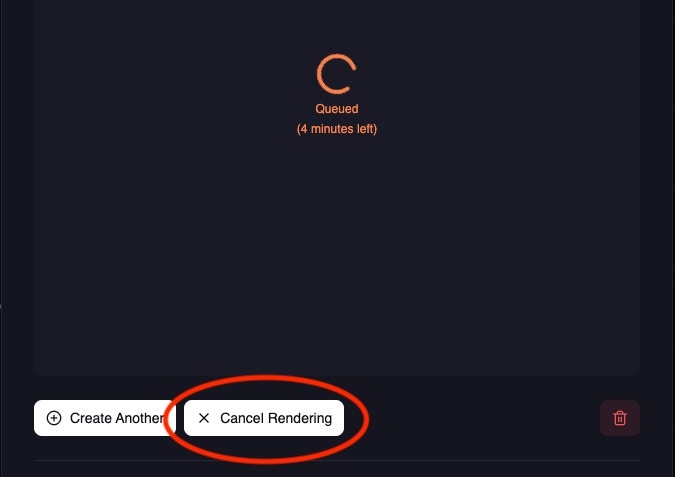
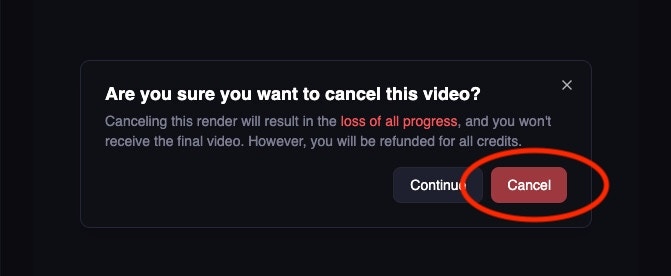
 Notes:
* Image jobs cannot be cancelled (they complete too quickly)
* API-based cancellation is not currently available
* Full credit refund is provided for cancelled video jobs
## Next steps
Set up real-time notifications for production apps
Explore all available endpoints and parameters
Try all 22 APIs with ready-to-run examples
Advanced file upload and management techniques
***
**Need help?** Join our [Discord community](https://discord.com/invite/JX5rgsZaJp) or email [support@magichour.ai](mailto:support@magichour.ai)
Notes:
* Image jobs cannot be cancelled (they complete too quickly)
* API-based cancellation is not currently available
* Full credit refund is provided for cancelled video jobs
## Next steps
Set up real-time notifications for production apps
Explore all available endpoints and parameters
Try all 22 APIs with ready-to-run examples
Advanced file upload and management techniques
***
**Need help?** Join our [Discord community](https://discord.com/invite/JX5rgsZaJp) or email [support@magichour.ai](mailto:support@magichour.ai)