> ## Documentation Index
> Fetch the complete documentation index at: https://docs.magichour.ai/llms.txt
> Use this file to discover all available pages before exploring further.
# Create a Webhook
> Set up and test your first webhook end-to-end to receive real-time notifications from Magic Hour.
By the end of this guide, you'll have:
* ✅ Created a webhook endpoint in your application
* ✅ Registered it with Magic Hour
* ✅ Tested it with a real API call
* ✅ Verified webhook delivery works
## What Are Webhooks?
Webhooks let you receive real-time notifications when your API requests complete, eliminating the need for polling. Instead of repeatedly checking job status, Magic Hour automatically notifies your application when jobs finish.
```mermaid theme={null}
sequenceDiagram
participant App as Your Application
participant MH as Magic Hour
App->>MH: 1. Create video/image job
MH-->>App: 2. Job ID returned immediately
MH->>MH: 3. Process job in background
MH->>App: 4. Send webhook when complete
App->>MH: 5. Return 2xx Response
```
**Benefits:**
* ✅ Real-time notifications (no polling delays)
* ✅ Efficient resource usage (no constant polling)
* ✅ Better user experience (instant updates)
* ✅ Scalable for high-volume operations
## Step 1: Create Your Webhook Endpoint
First, create a simple webhook handler that can receive and process events.
**Using Jupyter/Colab?** See the "Colab/Jupyter" tab below for notebook-compatible code, or use
[webhook.site](https://webhook.site) for instant testing without any code.
```python Python (FastAPI) theme={null}
from fastapi import FastAPI, Request
import json
app = FastAPI()
@app.post("/webhook")
async def webhook_handler(request: Request):
# Get the event data
event = await request.json()
# Log the event for testing
print(f"Received event: {event['type']}")
print(f"Payload: {json.dumps(event['payload'], indent=2)}")
# Handle different event types
match event['type']:
case 'video.started':
print('🎬 Video processing started')
case 'video.completed':
print('✅ Video processing completed')
# Download URL available in event['payload']['downloads']
case 'video.errored':
print('❌ Video processing failed')
case 'image.completed':
print('🖼️ Image processing completed')
case 'image.errored':
print('❌ Image processing failed')
# Always return success
return {"success": True}
if __name__ == "__main__":
import uvicorn
uvicorn.run(app, host="0.0.0.0", port=8000)
```
```javascript Node.js (Express) theme={null}
const express = require("express");
const app = express();
app.use(express.json());
app.post("/webhook", (req, res) => {
const { type, payload } = req.body;
// Log the event for testing
console.log(`Received event: ${type}`);
console.log(`Payload:`, JSON.stringify(payload, null, 2));
// Handle different event types
switch (type) {
case "video.started":
console.log("🎬 Video processing started");
break;
case "video.completed":
console.log("✅ Video processing completed");
// Download URL available in payload.downloads
break;
case "video.errored":
console.log("❌ Video processing failed");
break;
case "image.completed":
console.log("🖼️ Image processing completed");
break;
case "image.errored":
console.log("❌ Image processing failed");
break;
}
// Always return success
res.status(200).json({ success: true });
});
const port = 8000;
app.listen(port, () => {
console.log(`🚀 Webhook server running on http://localhost:${port}`);
});
```
```python Colab/Jupyter theme={null}
# Notebook-friendly webhook server
from fastapi import FastAPI, Request
import json
import nest_asyncio
import threading
import uvicorn
import time
# Install required packages first:
# !pip install fastapi uvicorn nest-asyncio pyngrok
# Allow nested event loops (required for notebooks)
nest_asyncio.apply()
app = FastAPI()
@app.post("/webhook")
async def webhook_handler(request: Request):
# Get the event data
event = await request.json()
# Log the event for testing
print(f"Received event: {event['type']}")
print(f"Payload: {json.dumps(event['payload'], indent=2)}")
# Handle different event types
match event['type']:
case 'video.completed':
print('✅ Video processing completed')
case 'image.completed':
print('🖼️ Image processing completed')
case _:
print(f'Event: {event["type"]}')
return {"success": True}
# Notebook-friendly server startup
def run_server():
uvicorn.run(app, host="0.0.0.0", port=8000, log_level="info")
# Start server in background thread
server_thread = threading.Thread(target=run_server, daemon=True)
server_thread.start()
# Wait for server to start
time.sleep(2)
print("🚀 Webhook server running on http://localhost:8000")
# For Colab: Use ngrok to make it public
try:
from pyngrok import ngrok
public_url = ngrok.connect(8000)
print(f"📡 Public URL: {public_url}")
print(f"Use this URL in Magic Hour: {public_url}/webhook")
except ImportError:
print("💡 Install pyngrok for public URL: !pip install pyngrok")
print("Or use webhook.site for easier testing")
```
## Step 2: Make Your Endpoint Publicly Accessible
Your webhook endpoint needs to be accessible from the internet. Choose one of these options:
**Perfect for local development and testing**
**Install ngrok:**
```bash theme={null}
# macOS
brew install ngrok
# Windows/Linux - download from https://ngrok.com/download
```
**Start your server:**
```bash Python theme={null}
python webhook_server.py
# or
uvicorn main:app --host 0.0.0.0 --port 8000
```
```bash Node.js theme={null}
node webhook_server.js
```
**Expose it publicly:**
```bash theme={null}
ngrok http 8000
```
**Copy the HTTPS URL** (e.g., `https://abc123.ngrok.io`)
**Perfect for Colab/Jupyter users and quick testing!** No server setup required.
1. Go to [webhook.site](https://webhook.site)
2. Copy the unique URL provided (e.g., `https://webhook.site/abc-123-def`)
3. Use this URL directly in Magic Hour webhook setup
4. View received webhooks in real-time in your browser
5. Perfect for testing and debugging webhook payloads
**Pros**: Instant setup, no code needed, great for testing\
**Cons**: Public URL, not suitable for production
**For production deployments:**
Deploy your webhook handler to:
* **Cloud platforms**: AWS Lambda, Google Cloud Functions, Azure Functions
* **Server hosting**: DigitalOcean, Heroku, Railway
* **Container services**: Docker, Kubernetes
Ensure your production server:
* Has a valid SSL certificate (HTTPS required)
* Can handle incoming POST requests
* Returns responses within 10 seconds
* Has proper error handling and logging
## Step 3: Register Your Webhook with Magic Hour
Go to Magic Hour [Developer Hub](https://magichour.ai/developer?tab=webhooks), and click **Create Webhook**
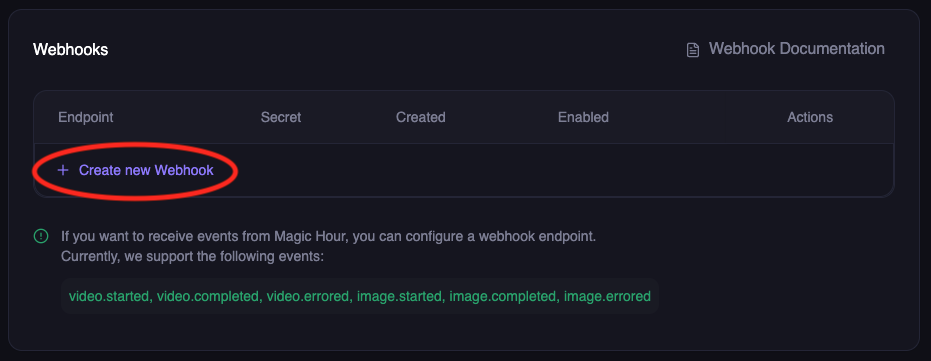 Enter your webhook details:
* **Endpoint URL**: Your public HTTPS URL (e.g., `https://abc123.ngrok.io/webhook`)
* **Events**: Select the events you want to receive:
* `video.started` - When video processing begins
* `video.completed` - When video is ready for download
* `video.errored` - When video processing fails
* `image.completed` - When image is ready for download
* `image.errored` - When image processing fails
* `audio.completed` - When audio is ready for download
* `audio.errored` - When audio processing fails
Enter your webhook details:
* **Endpoint URL**: Your public HTTPS URL (e.g., `https://abc123.ngrok.io/webhook`)
* **Events**: Select the events you want to receive:
* `video.started` - When video processing begins
* `video.completed` - When video is ready for download
* `video.errored` - When video processing fails
* `image.completed` - When image is ready for download
* `image.errored` - When image processing fails
* `audio.completed` - When audio is ready for download
* `audio.errored` - When audio processing fails
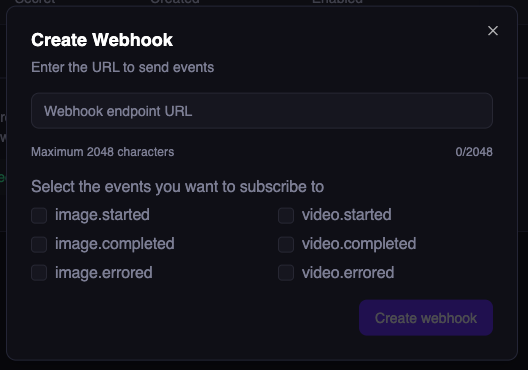 Click **Create Webhook**
**Important**: Copy and save the webhook secret - you'll need this for security verification later.
Click **Create Webhook**
**Important**: Copy and save the webhook secret - you'll need this for security verification later.
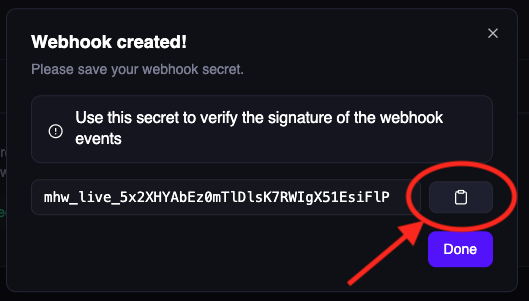 Store this secret securely! It's used to verify that webhooks are actually from Magic Hour.
## Step 4: Test Your Webhook End-to-End
Now let's verify everything works by making a real API call and watching for the webhook.
**If using your own server**: Watch the console logs
```bash theme={null}
# Your server should show:
🚀 Webhook server running on http://localhost:8000
```
**If using Colab/Jupyter**: Watch the cell output for webhook events
**If using webhook.site**: Keep the browser tab open to see incoming requests in real-time
Create a simple image to trigger webhook events:
```python Python/Colab theme={null}
from magic_hour import Client
client = Client(token="your-api-key")
# Create a simple AI image - this will trigger webhooks
result = client.v1.ai_image_generator.generate(
image_count=1,
orientation="square",
style={"prompt": "A cute cat wearing sunglasses", "tool": "ai-anime-generator"}
)
print(f"Job created! ID: {result.id}")
print("Watch your webhook endpoint for events...")
# In Colab, you'll see the webhook events appear in the cell output above
```
```bash cURL theme={null}
curl -X POST "https://api.magichour.ai/v1/ai-image-generator" \
-H "Authorization: Bearer your-api-key" \
-H "Content-Type: application/json" \
-d '{
"image_count": 1,
"orientation": "square",
"style": {
"prompt": "A cute cat wearing sunglasses",
"tool": "ai-anime-generator"
}
}'
```
```python webhook.site Testing theme={null}
# If using webhook.site, you don't need a server
# Just make the API call and watch the webhook.site browser tab
from magic_hour import Client
client = Client(token="your-api-key")
result = client.v1.ai_image_generator.generate(
image_count=1,
orientation="square",
style={"prompt": "A cute cat wearing sunglasses", "tool": "ai-anime-generator"}
)
print(f"Job created! ID: {result.id}")
print("Check your webhook.site browser tab for the webhook delivery!")
```
Within seconds, you should see webhook events in your console or webhook.site:
```json theme={null}
{
"type": "image.completed",
"payload": {
"id": "clx7uu86w0a5qp55yxz315r6r",
"status": "complete",
"downloads": [
{
"url": "https://images.magichour.ai/id/output.png",
"expires_at": "2024-10-19T05:16:19.027Z"
}
]
}
}
```
**Success!** 🎉 Your webhook is working end-to-end.
## Understanding Webhook Retries
If your endpoint doesn't respond with a 2xx status code, Magic Hour will retry delivery:
* **Duration**: Up to 24 hours
* **Pattern**: Exponential backoff (1s, 2s, 4s, 8s, ...)
* **After 24 hours**: Event marked as failed, no more retries
**Disabled Webhooks**: If a webhook is disabled, pending events are skipped and marked as failed
after 24 hours.
### Best Practices for Reliable Webhooks
✅ **Do:**
* Return 2xx status codes within 10 seconds
* Process events asynchronously (respond fast, process later)
* Implement idempotent processing (handle duplicate events)
* Log all webhook events for debugging
❌ **Don't:**
* Perform long-running operations before responding
* Return non-2xx codes for successful receipt
* Assume events are delivered exactly once
* Block the response while processing
## Production Webhook Handler
For production, implement robust error handling and background processing:
```python Python (Production) theme={null}
from fastapi import FastAPI, Request, BackgroundTasks
import logging
app = FastAPI()
logger = logging.getLogger(__name__)
@app.post("/webhook")
async def webhook_handler(request: Request, background_tasks: BackgroundTasks):
try:
event = await request.json()
# Log the event
logger.info(f"Received webhook: {event['type']}", extra={
'job_id': event['payload'].get('id'),
'status': event['payload'].get('status')
})
# Respond immediately
background_tasks.add_task(process_webhook_event, event)
return {"success": True}
except Exception as e:
logger.error(f"Webhook error: {e}")
return {"error": "Internal error"}, 500
async def process_webhook_event(event):
"""Process webhook in background"""
try:
event_type = event['type']
payload = event['payload']
if event_type == 'video.completed':
# Update database
await update_job_status(payload['id'], 'completed')
# Notify user
await notify_user_completion(payload)
elif event_type == 'video.errored':
# Handle error
await update_job_status(payload['id'], 'failed')
await notify_user_error(payload)
except Exception as e:
logger.error(f"Background processing failed: {e}")
```
```javascript Node.js (Production) theme={null}
const express = require("express");
const { createLogger, format, transports } = require("winston");
const app = express();
const logger = createLogger({
level: "info",
format: format.json(),
transports: [new transports.File({ filename: "webhook.log" }), new transports.Console()],
});
app.use(express.json());
app.post("/webhook", async (req, res) => {
try {
const { type, payload } = req.body;
// Log the event
logger.info("Received webhook", {
eventType: type,
jobId: payload.id,
status: payload.status,
});
// Respond immediately
res.status(200).json({ success: true });
// Process asynchronously
processWebhookEvent(type, payload);
} catch (error) {
logger.error("Webhook error", { error: error.message });
res.status(500).json({ error: "Internal error" });
}
});
async function processWebhookEvent(type, payload) {
try {
if (type === "video.completed") {
// Update database
await updateJobStatus(payload.id, "completed");
// Notify user
await notifyUserCompletion(payload);
} else if (type === "video.errored") {
// Handle error
await updateJobStatus(payload.id, "failed");
await notifyUserError(payload);
}
} catch (error) {
logger.error("Background processing failed", { error: error.message });
}
}
const port = process.env.PORT || 8000;
app.listen(port, () => {
logger.info(`Webhook server running on port ${port}`);
});
```
## Testing Locally
Before registering with Magic Hour, test your handler locally:
```bash theme={null}
# Start your server
python webhook_server.py # or node webhook_server.js
# In another terminal, send a test event
curl -X POST http://localhost:8000/webhook \
-H "Content-Type: application/json" \
-d '{
"type": "video.completed",
"payload": {
"id": "test-job-123",
"status": "complete",
"downloads": [
{
"url": "https://videos.magichour.ai/test/output.mp4",
"expires_at": "2024-12-01T12:00:00Z"
}
]
}
}'
```
You should see the event logged in your server console.
## Webhook Handler Requirements
Your webhook endpoint must:
### 1. Accept POST Requests
```python theme={null}
@app.post("/webhook") # Must be POST
async def webhook_handler(request: Request):
...
```
### 2. Parse JSON Payload
```python theme={null}
event = await request.json()
# event = { "type": "...", "payload": {...} }
```
### 3. Return 2xx Status Code
```python theme={null}
return {"success": True} # Returns 200
# Magic Hour interprets this as successful delivery
```
### 4. Respond Within 10 Seconds
```python theme={null}
# ✅ Good: Respond fast, process later
background_tasks.add_task(process_event, event)
return {"success": True}
# ❌ Bad: Long processing blocks response
process_event_synchronously(event) # This might timeout!
return {"success": True}
```
## Troubleshooting
**Webhook not receiving events?**
* ✅ Check your endpoint URL is publicly accessible
* ✅ Ensure your server returns HTTP 2xx status codes
* ✅ Verify the webhook is enabled in Developer Hub
* ✅ Check server logs for errors
* ✅ Test with ngrok or webhook.site first
**Colab/Jupyter specific issues:**
* ✅ Install required packages: `!pip install fastapi uvicorn nest-asyncio pyngrok`
* ✅ Make sure the server thread started successfully
* ✅ Check if ngrok tunnel is active and accessible
* ✅ Try webhook.site as an alternative for quick testing
**AsyncIO errors in notebooks?**
* ✅ Use the Colab/Jupyter code version with `nest_asyncio.apply()`
* ✅ Don't run `uvicorn.run()` directly in notebooks - use the threading approach
## Next Steps
Now that your webhook is working:
Add signature verification to ensure webhooks are from Magic Hour
Learn about all available webhook events and their payloads
Complete webhook API documentation
Build a complete integration from scratch
***
**Need help?** Join our [Discord community](https://discord.com/invite/JX5rgsZaJp) or email [support@magichour.ai](mailto:support@magichour.ai)
Store this secret securely! It's used to verify that webhooks are actually from Magic Hour.
## Step 4: Test Your Webhook End-to-End
Now let's verify everything works by making a real API call and watching for the webhook.
**If using your own server**: Watch the console logs
```bash theme={null}
# Your server should show:
🚀 Webhook server running on http://localhost:8000
```
**If using Colab/Jupyter**: Watch the cell output for webhook events
**If using webhook.site**: Keep the browser tab open to see incoming requests in real-time
Create a simple image to trigger webhook events:
```python Python/Colab theme={null}
from magic_hour import Client
client = Client(token="your-api-key")
# Create a simple AI image - this will trigger webhooks
result = client.v1.ai_image_generator.generate(
image_count=1,
orientation="square",
style={"prompt": "A cute cat wearing sunglasses", "tool": "ai-anime-generator"}
)
print(f"Job created! ID: {result.id}")
print("Watch your webhook endpoint for events...")
# In Colab, you'll see the webhook events appear in the cell output above
```
```bash cURL theme={null}
curl -X POST "https://api.magichour.ai/v1/ai-image-generator" \
-H "Authorization: Bearer your-api-key" \
-H "Content-Type: application/json" \
-d '{
"image_count": 1,
"orientation": "square",
"style": {
"prompt": "A cute cat wearing sunglasses",
"tool": "ai-anime-generator"
}
}'
```
```python webhook.site Testing theme={null}
# If using webhook.site, you don't need a server
# Just make the API call and watch the webhook.site browser tab
from magic_hour import Client
client = Client(token="your-api-key")
result = client.v1.ai_image_generator.generate(
image_count=1,
orientation="square",
style={"prompt": "A cute cat wearing sunglasses", "tool": "ai-anime-generator"}
)
print(f"Job created! ID: {result.id}")
print("Check your webhook.site browser tab for the webhook delivery!")
```
Within seconds, you should see webhook events in your console or webhook.site:
```json theme={null}
{
"type": "image.completed",
"payload": {
"id": "clx7uu86w0a5qp55yxz315r6r",
"status": "complete",
"downloads": [
{
"url": "https://images.magichour.ai/id/output.png",
"expires_at": "2024-10-19T05:16:19.027Z"
}
]
}
}
```
**Success!** 🎉 Your webhook is working end-to-end.
## Understanding Webhook Retries
If your endpoint doesn't respond with a 2xx status code, Magic Hour will retry delivery:
* **Duration**: Up to 24 hours
* **Pattern**: Exponential backoff (1s, 2s, 4s, 8s, ...)
* **After 24 hours**: Event marked as failed, no more retries
**Disabled Webhooks**: If a webhook is disabled, pending events are skipped and marked as failed
after 24 hours.
### Best Practices for Reliable Webhooks
✅ **Do:**
* Return 2xx status codes within 10 seconds
* Process events asynchronously (respond fast, process later)
* Implement idempotent processing (handle duplicate events)
* Log all webhook events for debugging
❌ **Don't:**
* Perform long-running operations before responding
* Return non-2xx codes for successful receipt
* Assume events are delivered exactly once
* Block the response while processing
## Production Webhook Handler
For production, implement robust error handling and background processing:
```python Python (Production) theme={null}
from fastapi import FastAPI, Request, BackgroundTasks
import logging
app = FastAPI()
logger = logging.getLogger(__name__)
@app.post("/webhook")
async def webhook_handler(request: Request, background_tasks: BackgroundTasks):
try:
event = await request.json()
# Log the event
logger.info(f"Received webhook: {event['type']}", extra={
'job_id': event['payload'].get('id'),
'status': event['payload'].get('status')
})
# Respond immediately
background_tasks.add_task(process_webhook_event, event)
return {"success": True}
except Exception as e:
logger.error(f"Webhook error: {e}")
return {"error": "Internal error"}, 500
async def process_webhook_event(event):
"""Process webhook in background"""
try:
event_type = event['type']
payload = event['payload']
if event_type == 'video.completed':
# Update database
await update_job_status(payload['id'], 'completed')
# Notify user
await notify_user_completion(payload)
elif event_type == 'video.errored':
# Handle error
await update_job_status(payload['id'], 'failed')
await notify_user_error(payload)
except Exception as e:
logger.error(f"Background processing failed: {e}")
```
```javascript Node.js (Production) theme={null}
const express = require("express");
const { createLogger, format, transports } = require("winston");
const app = express();
const logger = createLogger({
level: "info",
format: format.json(),
transports: [new transports.File({ filename: "webhook.log" }), new transports.Console()],
});
app.use(express.json());
app.post("/webhook", async (req, res) => {
try {
const { type, payload } = req.body;
// Log the event
logger.info("Received webhook", {
eventType: type,
jobId: payload.id,
status: payload.status,
});
// Respond immediately
res.status(200).json({ success: true });
// Process asynchronously
processWebhookEvent(type, payload);
} catch (error) {
logger.error("Webhook error", { error: error.message });
res.status(500).json({ error: "Internal error" });
}
});
async function processWebhookEvent(type, payload) {
try {
if (type === "video.completed") {
// Update database
await updateJobStatus(payload.id, "completed");
// Notify user
await notifyUserCompletion(payload);
} else if (type === "video.errored") {
// Handle error
await updateJobStatus(payload.id, "failed");
await notifyUserError(payload);
}
} catch (error) {
logger.error("Background processing failed", { error: error.message });
}
}
const port = process.env.PORT || 8000;
app.listen(port, () => {
logger.info(`Webhook server running on port ${port}`);
});
```
## Testing Locally
Before registering with Magic Hour, test your handler locally:
```bash theme={null}
# Start your server
python webhook_server.py # or node webhook_server.js
# In another terminal, send a test event
curl -X POST http://localhost:8000/webhook \
-H "Content-Type: application/json" \
-d '{
"type": "video.completed",
"payload": {
"id": "test-job-123",
"status": "complete",
"downloads": [
{
"url": "https://videos.magichour.ai/test/output.mp4",
"expires_at": "2024-12-01T12:00:00Z"
}
]
}
}'
```
You should see the event logged in your server console.
## Webhook Handler Requirements
Your webhook endpoint must:
### 1. Accept POST Requests
```python theme={null}
@app.post("/webhook") # Must be POST
async def webhook_handler(request: Request):
...
```
### 2. Parse JSON Payload
```python theme={null}
event = await request.json()
# event = { "type": "...", "payload": {...} }
```
### 3. Return 2xx Status Code
```python theme={null}
return {"success": True} # Returns 200
# Magic Hour interprets this as successful delivery
```
### 4. Respond Within 10 Seconds
```python theme={null}
# ✅ Good: Respond fast, process later
background_tasks.add_task(process_event, event)
return {"success": True}
# ❌ Bad: Long processing blocks response
process_event_synchronously(event) # This might timeout!
return {"success": True}
```
## Troubleshooting
**Webhook not receiving events?**
* ✅ Check your endpoint URL is publicly accessible
* ✅ Ensure your server returns HTTP 2xx status codes
* ✅ Verify the webhook is enabled in Developer Hub
* ✅ Check server logs for errors
* ✅ Test with ngrok or webhook.site first
**Colab/Jupyter specific issues:**
* ✅ Install required packages: `!pip install fastapi uvicorn nest-asyncio pyngrok`
* ✅ Make sure the server thread started successfully
* ✅ Check if ngrok tunnel is active and accessible
* ✅ Try webhook.site as an alternative for quick testing
**AsyncIO errors in notebooks?**
* ✅ Use the Colab/Jupyter code version with `nest_asyncio.apply()`
* ✅ Don't run `uvicorn.run()` directly in notebooks - use the threading approach
## Next Steps
Now that your webhook is working:
Add signature verification to ensure webhooks are from Magic Hour
Learn about all available webhook events and their payloads
Complete webhook API documentation
Build a complete integration from scratch
***
**Need help?** Join our [Discord community](https://discord.com/invite/JX5rgsZaJp) or email [support@magichour.ai](mailto:support@magichour.ai)